Understanding Instagram Privacy Settings (And Why They Matter for Growth)
Most people open Instagram's privacy settings once — usually after a mildly alarming notification — and never look at them again. What they don't realize is that those settings are also quietly controlling how many people can find their content, engage with it, and decide to follow them.
This guide covers Instagram's key privacy settings in plain language, explains what each one does to your visibility, and shows you how to configure them strategically — so your account is set up for discovery, not just protection.
Public vs. Private Account: Your Single Most Important Decision
A private Instagram account means that new visitors can't see your posts, Reels, or Stories without sending a follow request that you manually approve. Your content won't appear on the Explore page for people who don't already follow you, and your Reels won't be shown to non-followers in their feed.
For any creator focused on growth — brand, educator, small business, or influencer — a public account is essential. It's the prerequisite for every other discovery mechanism on the platform.
To check: go to Profile → Menu (☰) → Settings and Privacy → Account Privacy. Make sure Private Account is toggled off.
Your Followers and Following Lists: The Social Proof Angle
On a public Instagram account, your follower count is visible to anyone who visits your profile — and that number does real work. When a new visitor lands on your page and sees a meaningful following, it functions as immediate social proof. Someone else has already vetted you.
If you want to hide who you follow (for example, you're monitoring competitors and prefer discretion), Instagram doesn't offer a direct "hide following list" toggle the way TikTok does. Your following list is publicly visible by default. The practical workaround is keeping your account public while being intentional about who you follow publicly — some creators use a secondary account for competitive research.
Activity Status and Interaction Visibility
Instagram's Activity Status setting (Settings → Messages and Story Replies → Show Activity Status) controls whether people can see when you were last active. This doesn't affect discoverability, but it's worth knowing: turning it off means you also can't see others' activity status, which can matter if you're actively building collaborations or partnerships through DMs.
Similarly, the Like and View Counts setting (Settings → Privacy → Posts → Hide Like and View Counts) lets you hide engagement numbers on your own posts. For growth-focused accounts, this is usually worth leaving visible — engagement counts are a form of social proof that compounds over time as new visitors assess whether your content is worth following.
![[object Object]](/blog/images/airtable/section1-instagram-privacy-settings-explained-use-grow-following.webp)
Privacy Settings That Directly Shape Your Reach on Instagram
Beyond the public/private toggle, Instagram gives you granular control over several settings — and each one has a real effect on how many people can find, engage with, and share your content.
Reels Sharing and Remixing
Reels are Instagram's primary discovery engine. The equivalent of TikTok's Stitch and Duet features, Instagram's Remix function lets other creators respond to your Reel side-by-side — which puts your original content in front of their entire audience. This is free, organic distribution with a built-in warm introduction.
Many creators turn Remix off reflexively without realizing they're closing one of the most effective organic growth channels on the platform. Keep it on unless you have a specific reason not to. Manage this at Settings → Privacy → Reels and Remix, or on individual Reels via the advanced settings before posting.
Story Privacy and Close Friends
Instagram Stories have their own privacy layer. You can share Stories publicly (to all followers), restrict them to a Close Friends list, or hide them from specific people. For growth-focused accounts, the key insight is this: Stories shown to your full audience generate more replies, DM conversations, and profile visits than restricted ones — and each of those interactions signals to Instagram's algorithm that your account is worth surfacing to more people.
Close Friends is a legitimate tool for premium or exclusive content, but don't default to it out of habit. A Story that 80% of your followers never see is a missed engagement opportunity.
Tags, Mentions, and Tagging Permissions
Under Settings → Privacy → Tags and Mentions, you control who can tag or mention you in their posts and Stories. For public creator accounts, keeping this open to Everyone (or at least People You Follow) ensures you benefit when others mention your work. When someone with a larger audience tags you in a relevant post, their followers see your name — that's discovery you didn't have to create yourself.
Comment Controls
Comments are engagement signals. They tell Instagram's algorithm that your content is generating conversation — which gets it pushed to more people. Turning off comments removes that signal entirely. The better approach: keep comments open, use Instagram's built-in keyword and phrase filters to catch spam automatically (Settings → Privacy → Comments → Filters), and reply actively in the first hour after posting. Early engagement velocity is one of the strongest signals you can send the algorithm.
![[object Object]](/blog/images/airtable/section2-instagram-privacy-settings-explained-use-grow-following.webp)
How to Use Instagram Settings to Build a More Promotable Profile
Privacy settings don't work in isolation — they interact with everything else about your account. Here's how to think about them as part of a broader promotion strategy.
Your Profile Is a Landing Page
When someone discovers your Reel on Explore and taps your username, they land on your profile grid. They're making a split-second decision. A public account with a complete bio, a visible post grid, and an accessible link converts that visit into a follow. A restricted profile — hidden posts, no bio link, comments off — creates friction and most people leave without following.
The same principle marketers apply to landing pages applies here: remove every unnecessary obstacle between a new visitor and the Follow button. That means a clear bio that explains who you are and what they'll get, a pinned Reel or post that represents your best work, and a working link in your bio.
Professional Account Unlocks Promotion Tools
Switching to a Professional Account (Creator or Business) at Settings → Account → Switch to Professional Account doesn't limit your privacy — it expands your promotional toolkit. You get access to Instagram Insights (so you can see which content is actually driving follows), the ability to add a contact button, category labels, and the option to boost posts. None of this costs you visibility; it only adds to it.
Cross-Platform Promotion Only Works If Your Account Is Open
When you share your Instagram profile link on LinkedIn, TikTok, in a newsletter, or in your email signature, people click through expecting to see your content. A public account delivers that instantly. A private one makes them request access first — and the majority won't. If you're driving traffic to your Instagram from anywhere outside the app, public settings are what make that effort pay off.
CTAs That Actually Move People
Generic "follow me for more" CTAs at the end of videos don't convert well. The ones that do are specific: "Follow for weekly Reels scripts you can steal" or "Follow so you don't miss the next breakdown." Give people a concrete reason that matches what they just watched. Pair a specific CTA with an open, fully public profile and you've removed every barrier between interest and action.
![[object Object]](/blog/images/airtable/section3-instagram-privacy-settings-explained-use-grow-following.webp)
Creating Content That Turns Open Settings Into Followers
Open settings create the conditions for growth. But they only deliver if the content itself is worth landing on.
Open Settings Are Social Proof in Action
An account with comments enabled, Remix on, mentions open, and visible engagement counts communicates confidence. It tells both the algorithm and new visitors that this creator is here to engage. That openness invites the kind of interaction — comments, shares, Remixes — that compounds reach over time. Contrast this with a locked-down account where every interaction pathway is restricted: even great content struggles to gain traction.
Make Every Reel Worth Landing On with BIGVU
BIGVU's teleprompter lets you deliver scripts confidently without breaking eye contact — the kind of direct, assured delivery that drives watch-through rates on Reels. Higher watch-through means Instagram shows your content to more people; it's one of the platform's primary ranking signals. BIGVU's auto-caption feature handles subtitles automatically, which matters even more on Instagram than TikTok: the majority of Instagram videos are watched without sound in feed, so captions are the difference between a viewer who stays and one who scrolls. Add consistent branding — logos, colors, intro sequences — across every video and your profile grid looks intentional when new visitors arrive, which converts significantly better than a scattered feed.
Trending Audio Multiplies Your Reach
Instagram's algorithm surfaces Reels that use popular audio to viewers who've recently engaged with that sound — it's a built-in discovery loop. Combine trending audio with a fully open account and niche-specific content, and you're creating multiple simultaneous pathways for new viewers to find you. BIGVU's royalty-free music library gives you a starting point for video backgrounds and b-roll without licensing risk.
Remix, Carousels, and Format Mix
Beyond keeping your Remix setting open, actively creating Remix responses to high-performing Reels in your niche is one of the fastest ways to borrow existing momentum. Instagram also rewards content variety: carousels consistently drive saves (Instagram's highest-value engagement signal), while Reels drive new reach. BIGVU's teleprompter handles the talking-head Reel format, and the platform's video styling tools make it easy to maintain a consistent look across every format you post.
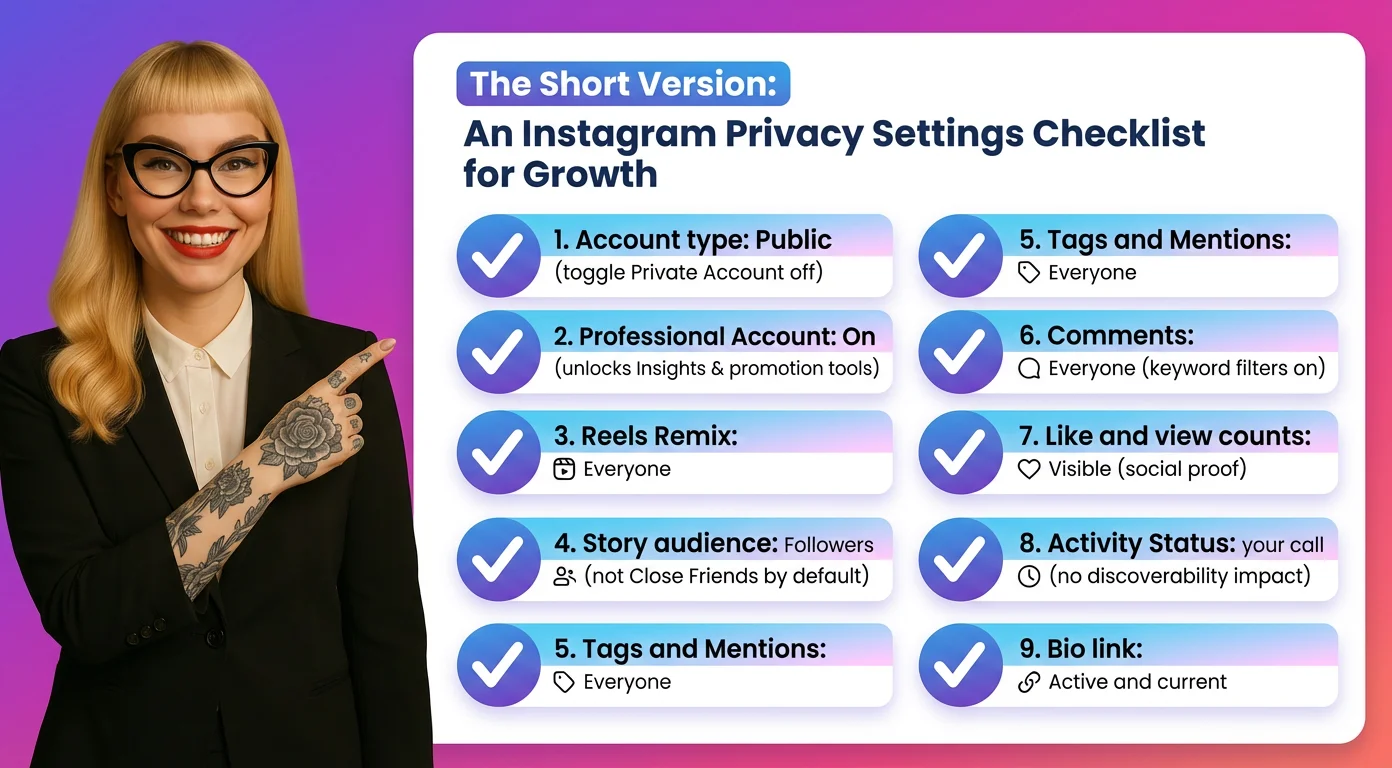
The Short Version: An Instagram Privacy Settings Checklist for Growth
Here's the full checklist. Most of these take under a minute to change.
- Account type: Public. Settings → Account Privacy → Private Account → toggle off.
- Professional Account: On. Settings → Account → Switch to Professional Account. Unlocks Insights and promotion tools with no visibility cost.
- Reels Remix: Everyone. Settings → Privacy → Reels and Remix. One of the most powerful free distribution mechanisms on Instagram.
- Story audience: Followers (not Close Friends by default). Save Close Friends for genuinely exclusive content.
- Tags and Mentions: Everyone (or People You Follow). Let people surface your account to their audiences.
- Comments: Everyone with keyword filters on. Keep comments open; let the filter handle spam automatically.
- Like and view counts: Visible. Social proof compounds over time — leave the numbers showing.
- Activity Status: Your call — doesn't affect discoverability either way.
- Bio link: Active and current. Every profile visit is a chance to convert; don't waste it with a broken or missing link.
Privacy and growth aren't in conflict on Instagram — the platform gives you enough control to protect what genuinely needs protecting while keeping every discovery pathway open. Get these settings right, and every piece of content you post starts from the strongest possible position.