Avatar first or camera first: how HeyGen and BIGVU approach AI video
HeyGen is an avatar studio. Its newest engine, Avatar V, was announced on April 8, 2026. Inside the app, the setup checklist sells it as "Just 15 seconds," and the flow is simple: upload a photo, then record your motion and voice, and HeyGen combines appearance, motion and voice into one avatar. The photo tips are sensible ones: look straight at the camera, use good even lighting, and keep just you in the frame. Once the avatar exists, your weekly video marketing becomes a writing job.
People who push it harder give more footage. Jack from Atomic Gains trained his clones on about 30 to 40 seconds and suggests being "a bit more exaggerated" on camera, because a flat recording comes out "slow and more robotic feeling." In a video sponsored by HeyGen, Mia Meow says the recommended training footage is 2 to 10 minutes and that you verify the avatar by reading a statement on camera.
BIGVU is a creation app for people who still record themselves. The core workflow is:
- Script: an AI writer drafts the script in your tone.
- Record: a teleprompter scrolls the words on your phone or laptop while you film.
- Fix: AI eye contact correction makes it look like you are looking into the lens while you read.
- Finish: captions, branding, cutaway footage and posting happen in the same app.
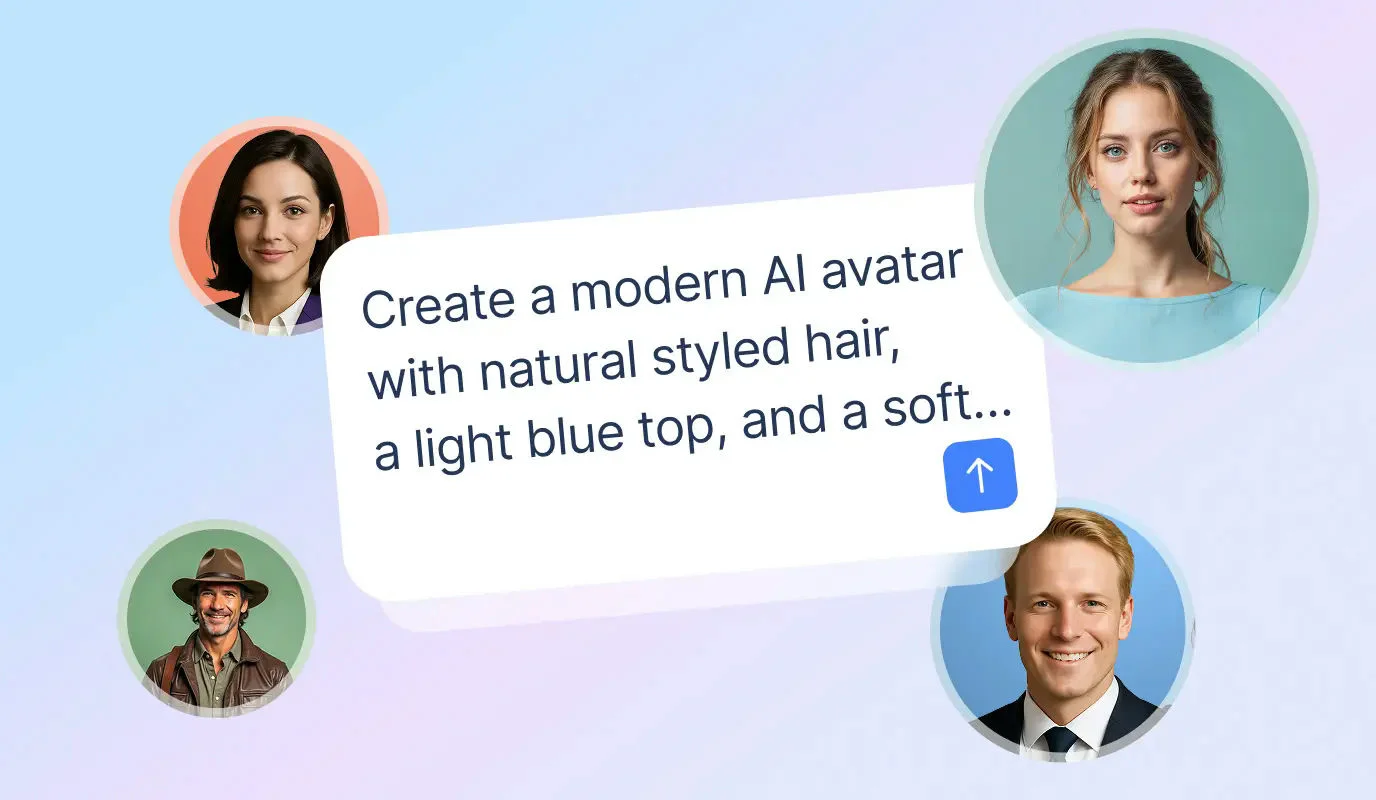
BIGVU does offer avatars too. A talking photo turns a single portrait into a lip synced video with a stock or cloned voice, its avatar generator has more than 100 ready made presenters, and the Max plan adds an AI Twin of your own face and voice. With HeyGen the avatar is the product. With BIGVU the avatar is a backup for the weeks you cannot film.

HeyGen vs BIGVU pricing in 2026, checked November 1
HeyGen's pricing has moved a lot this year. In March, reviewer Simon Crowe quoted Pro at $99 a month. In July, Holly Mack pointed out that HeyGen retired its unlimited plan on May 15, 2026, and that everything is now credit based. So ignore older posts and use these figures from the live pages.
- Free: $0, three watermarked videos a month up to one minute each, plus one Custom Video Avatar.
- Creator: $29 a month, or $24 billed annually. 600 credits, 1080p export, limited Avatar V usage. Unused credits roll over for one month.
- Pro: $49 a month for 1,000 credits. Adds 4K export, Seedance 2.5 and videos up to 30 minutes.
- Business: $149 a month plus $20 per extra seat. 1,500 credits, brand kit and asset library, SSO, and integrations such as HubSpot, Zapier, Make and n8n.
Two lines in HeyGen's FAQ deserve attention. Credits do not carry over after you cancel, so a balance you were saving disappears with the subscription. And one time credit packs are only for Business; Creator and Pro users upgrade to a bigger tier instead.
BIGVU (billed annually)
- Free: $0, 500 credits, 720p with a watermark, teleprompter and AI scripts included.
- Starter: $12 a month, 1080p without a watermark, one brand kit.
- AI Pro: $19 a month ($229 a year), 3,000 credits, 4K, eye contact correction, background replacement, AI dubbing in 30+ languages and a team workspace.
- Max: $49 a month ($589 a year), 10,000 credits, AI Twin face and voice clone, the VoiceMate AI agent, Claude MCP and the Video API.
For context, Synthesia lists Starter at $19 a month, or $14 a month billed yearly, and Pro at $89 a month, or $59 billed yearly.

What a minute of AI avatar video really costs, and how long it takes
Monthly prices only tell half the story, because both tools spend credits differently depending on the engine. HeyGen's help center lists these rates per minute:
- Avatar III: 7 credits for a photo avatar, 4 for a video avatar.
- Avatar IV: 16 credits for a photo avatar, 31 for a video avatar.
- Avatar V: 48 credits.
- Video Agent: 80 credits.
On those numbers, the 600 credits in Creator stretch to about 12 minutes of Avatar V or about 19 minutes of Avatar IV. BIGVU's pricing page says the 3,000 credits in AI Pro equal roughly one minute of portrait avatar video, and the 10,000 in Max roughly three minutes. To be fair to HeyGen, if you plan to publish a lot of fully synthetic avatar minutes, HeyGen gives you more of them for the money.
Our test on HeyGen Free
We gave a stock avatar a two sentence script. It rendered in roughly one and a half to two and a half minutes and came back as a 6.64 second file at 1280x720 with the HeyGen watermark burned into the corner. On Free, downloads were 720p only; 1080p, 4K and SCORM export were all marked as upgrades. The editor showed a four step tutorial overlay, script typing lagged and duplicated text until we reloaded the page, and a survey popped up right after we hit submit. None of that is a deal breaker, but it is worth knowing before you plan a deadline around a free account.
For comparison, Synthesia's free plan rendered the same two sentences with its avatar Krish in about four to four and a half minutes, also watermarked, and would only share the result by link or embed. Downloading the MP4 opened a paywall for Starter and above.
BIGVU's economics run the other way. If you record yourself with the teleprompter, most of your output is your own footage, so avatar credits only matter for the occasional talking photo or AI Twin video.

Brand kit, languages, team features and automation
Video branding and brand consistency are where many teams decide, because several people end up publishing under one logo.
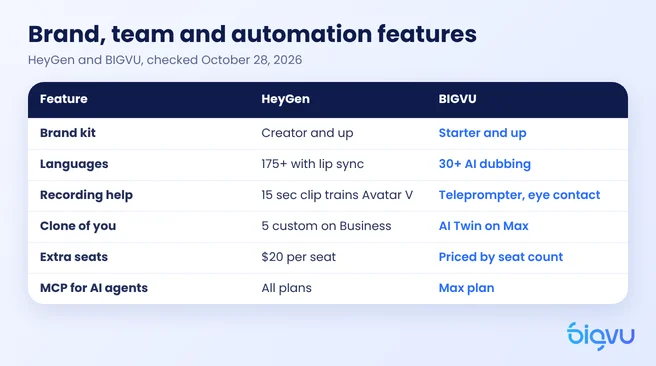
- Brand kit: on HeyGen Free we could create a Brand System straight from a website URL, and caption styles showed no lock icons. The full brand kit and asset library are listed on Business. BIGVU includes one brand kit from Starter, with branded captions, logos and colors applied as you edit. On Synthesia's free plan, brand kits were an Enterprise feature.
- Languages: HeyGen markets 175+ languages for paid plans. In our free account the Translate screen also said 175+ languages, but the pricing modal said 30+ for Free and videos were capped at one minute. BIGVU offers AI dubbing and avatar voiceovers in 30+ languages.
- Recording help: HeyGen is designed so that, once your avatar exists, you rarely need to film again. BIGVU's teleprompter and eye contact correction are the reason many people choose it.
- Distribution: BIGVU can send a video email with tracking, captions and a branded landing page, and it can schedule posts to social channels. HeyGen's strength is producing the video itself.
- Teams: HeyGen Business adds seats at $20 each. BIGVU AI Pro and Max include workspaces with roles, priced by seat count.
- Automation: HeyGen's MCP server works with Claude, Manus and OpenAI. BIGVU's Claude MCP connection and Video API are on Max.
If your team needs one presenter speaking dozens of languages, HeyGen is the stronger fit. If you need several real people posting on brand every week, BIGVU's mix of recording tools and shared brand settings is built for that.

Which tool fits real estate agents, coaches and small marketing teams
The honest answer depends on whose face your customers trust. In a side by side test of HeyGen and Synthesia on AWeber's Shift AI Show, one host said that as a buyer from a small business, "I would prefer an unvarnished you" to an eerily perfect avatar. Holly Mack made a related point about B2B video: "Most B2B teams aren't cloning their founder." She now defaults to Synthesia for stock presenter work because, in her words, it "caught up on quality."
- Choose HeyGen if you produce training, onboarding or explainer videos at volume, need many languages with lip sync, or want a digital presenter that never needs a camera day.
- Look at Synthesia if you mainly need stock presenters for corporate training and want a lower yearly entry price.
- Choose BIGVU if you are a real estate agent, coach, consultant or local business owner who wants to show up as yourself, needs help reading a script naturally, and wants editing, captions, video emails and posting in one place.
- Use both if you are a larger team: an avatar tool for multilingual explainers, BIGVU for the weekly personal videos that build relationships.
If the problem is time rather than tools, BIGVU also runs SuperAgent. A dedicated strategist plans and scripts your month, then the team edits, adds captions and thumbnails and publishes eight videos a month, two a week in vertical and horizontal formats. It costs $299 a month billed monthly or $239 a month with yearly billing, runs month to month, and you own every file. You record with the teleprompter or use a TalkingPhoto with your cloned voice.