Why AI scripts sound generic, and what to feed your AI script writer
A language model writes toward the average. Give it a topic and nothing else, and it returns the most likely version of that topic, which is exactly the version your audience has already heard. The fix is not a cleverer tool. It is better input.
Start with the viewer, not the topic
Van Hofwegen's first rule is to know who is watching. His example compares a bright, playful Minecraft thumbnail for kids with the plain, results focused style a business channel uses for owners. Both work, for completely different people. Scripts follow the same logic: "The way you talk, the examples you use, even the way you build your story, it all has to resonate with the person you're trying to reach." Before you prompt, write one sentence about the viewer: who they are, what they are stuck on, and what they would pay to fix.
Give the AI your raw material
- Your voice. Paste in a transcript of a past video or a few emails you wrote yourself, so the draft borrows your rhythm instead of a generic one.
- Your facts. Prices, results, client stories, the objection you hear every week. The model cannot know these, and they are what make a script specific.
- The format. Decide whether you need a word for word script or bullet points. Van Hofwegen writes everything out for technical or precise videos and uses bullets for stories and conversational pieces.
- The goal. One video, one action. Book a call, reply to an email, visit a listing.
Use a generator built for speaking
A general chatbot writes for the page. A video script generator should write for the mouth. BIGVU's AI Script Generator turns a topic, outline or goal into a script with an intro, key points and a call to action, structured for spoken delivery. You can rewrite lines, change the tone and trim sections, then send the script straight to the teleprompter without copying text between apps. Treat the output as a first draft. The draft saves you from the blank page; your edits are what make it yours.

Structure the script: hook, body and a close that asks for something
Most business videos lose people early, and the reason is usually the opening. Speakers spend the first lines on their name, their company and a thank you for watching. The viewer gets none of that as a reason to stay.
The hook
Van Hofwegen describes the job of a hook in two parts: confirm the click and open a curiosity loop. If the title promised help with pricing, the first sentence should be about pricing. Then make a promise you will pay off later, so the viewer has a reason to wait for it.
The first seconds carry more weight than the rest. TikTok's Marketing Science team reports that 50% of the impact of a TikTok ad is realized in the first 2 seconds, and that the first 6 seconds capture 90% of the cumulative impact on ad recall. That research covers ads, comes from TikTok itself and is based on a 2021 study, so read it as a direction rather than a law. The direction is clear enough: say the valuable thing first.
The body
- Lead with your strongest point. Starting with the best idea raises expectations for the rest of the video.
- Reveal points one at a time. If you list everything up front, viewers feel they have already watched the video and leave.
- Add rehooks. A short line such as "but if you skip the next step, none of this works" resets attention at each new section.
- Change something regularly. Van Hofwegen's rule of thumb is a new example, question or pattern break every 30 to 40 seconds.
The close
Summarize what the viewer learned, help them picture the result, then point to one next step. For a business video that step is concrete: a calendar link, a reply, a free consultation. A script without a clear ask is a nice video that sells nothing.

What happened when we gave our script to four AI video tools
A whole category of AI video tools promises to turn a script into a finished video with no camera at all. We wanted to know what they actually do with the words you give them, so we pasted the same short script into four of them on their free plans.
- Pictory: its agent, Pickford, read our tone as "Direct, motivational, practical," asked six questions and marked the script as locked. About 55 seconds later we had a script and roughly a minute and a half later a finished video built from stock footage, for 3.9 of the trial's 300 credits. Then we compared the voiceover with our text. Pickford had rewritten the narration despite the lock and added a logo we never asked for.
- InVideo AI: it kept our narration word for word under a label that read "Narration (verbatim, locked)." But the free plan blocked the voiceover and the music behind a paid plan, and the agent chat alone used 39.5 of our 50 free credits.
- Synthesia: its script chat drafted text well on the free plan. Its prompt to video agent, Syren, ran and spent credits but returned a video with no avatar and no spoken script.
- HeyGen: a stock avatar read our two sentences accurately and rendered in about two minutes, as a 720p watermarked file on the free plan.
The lesson is simple. Whatever tool you use, read the final voiceover against your original script before it goes live, especially if it contains a price, a promise or a compliance line.
Creators say the same
On r/aitubers, people who publish AI videos every week agree that all in one generators give you a rough draft that still needs manual scene fixes. Another YouTuber on r/PartneredYoutube spent about a month testing them and found Pictory's footage matching "just wrong half the time." Full editing agents cost real money too. Stephen W. Thomas tested OpusClip's AI Producer on a 90 second clip: it used 208 credits, about $10 by his estimate, ran for 18 minutes, and he noted the price was a beta discount on 414 credits.
Audiences notice
NielsenIQ tested AI generated ads with more than 2,000 people. According to its December 2024 release, consumers identified most of them and found them more "annoying," "boring" and "confusing" than traditional ads. A 2025 peer reviewed study of 358 consumers went a step further: simply telling people an ad was made with AI lowered its perceived value and their purchase intention. So let AI do the slow parts, such as the first draft, the timing and the captions, and keep a real person in front of the lens. In Wyzowl's 2026 survey, 85% of people said a video had convinced them to buy something. Wyzowl makes explainer videos, so treat that figure with care, but what persuades is usually a person the viewer can trust.

How to record from a script without sounding like you are reading
A good script can still die on camera. The words are right, but the eyes drift, the voice flattens and the viewer can tell you are reading. The goal is to sound like you are talking to one person. These steps help.
- Check the length before you record. BIGVU's Words to Minutes tool estimates how long a script takes to say out loud at your speaking pace, so you can cut before you film rather than after.
- Read it aloud and rewrite the stiff lines. If a sentence trips you up, it will trip you up on camera. Shorten it, or say it the way you would to a client across the table.
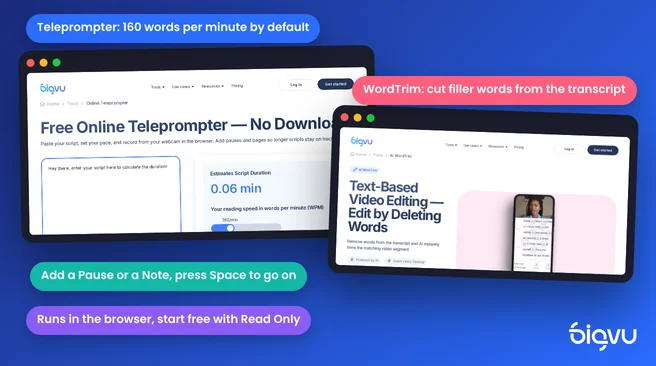
- Set the teleprompter to your pace. The BIGVU online teleprompter scrolls at 160 words per minute by default, and you can speed up, slow down or pause. It runs in the browser on Mac, PC and Chromebook, and you can start free with Read Only; recording and live streaming are on paid plans.
- Add cues for breathing room. Insert a Pause, a timed pause or a Note right in the script. Press Space to carry on at a pause. Cues stay out of captions and exports.
- Split long scripts into pages. For webinars or lessons, multi page mode stops at the end of each page so you can reset.
- Fix the gaze afterwards. Reading from a screen pulls your eyes slightly off the lens. AI Eye Contact Correction adjusts your gaze so you appear to look into the camera, without a retake.
- Edit by deleting words. With AI WordTrim, you cut a video by removing words from the transcript, including filler words, repeated phrases and long pauses.
Delivery tips from a camera pro
Gerald Undone, whose video on reading a teleprompter has more than half a million views, adds three habits. Put the camera a little further away and use a longer lens, so the side to side movement of your eyes is less obvious. Act out the emotion each sentence is supposed to carry. And use your normal voice: "don't over enunciate," because people can tell when something doesn't feel true.
One more habit makes a big difference: record the hook three times and keep the best take. It is the part people judge you on, and it is only a few seconds long.
Brand consistency and a weekly script to video routine
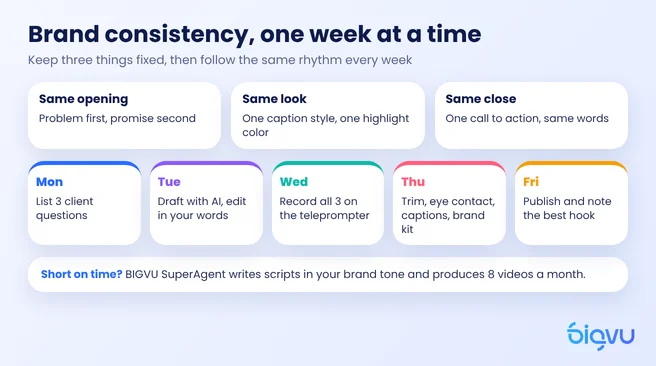
One strong video does little on its own. Viewers start to trust you when they see the same face, the same tone and the same look week after week. That is brand consistency in practice, and it is easier to keep when the routine is fixed.
Keep the same elements in every video
- The same opening shape. Viewer problem first, promise second, then the content.
- The same captions and colors. Pick one caption style and one highlight color, and apply your brand kit to every export.
- The same close. One call to action, said in the same words, so returning viewers know where to go.
A weekly rhythm
- Monday: list three questions clients asked you last week. Each one is a video topic.
- Tuesday: generate drafts with your AI script writer, then edit them in your own words and cut them to length.
- Wednesday: record all three in one session with the teleprompter.
- Thursday: trim, fix eye contact, add captions and your brand kit.
- Friday: publish, reply to comments and note which hook held attention best. Use that hook style next week.
When you want the team to do it
If even that rhythm is more than your week allows, BIGVU SuperAgent takes the writing and production off your plate. After a 30 minute kickoff call, the team writes scripts in your brand tone around your customers' real pain points, or works from your own. You record with the BIGVU teleprompter or skip the camera with TalkingPhoto and your cloned voice, and the team edits in your style, adds captions and thumbnails, and schedules the videos to your channels with a monthly report. The plan covers eight videos a month with a dedicated strategist for $299 a month billed monthly, or $239 a month with yearly billing. It runs month to month, you own every file, and the page promises the first video within five days.