Top Script Writing and Mobile Editing Apps for 2026
Streamlining Pre-Production with AI Scripts
Instead of staring at an empty page, use an AI script generator to turn a few notes about your business into a ready-to-record draft in your brand voice. You can then tweak the wording so it sounds like you, not a template.
Top Mobile Editing Solutions
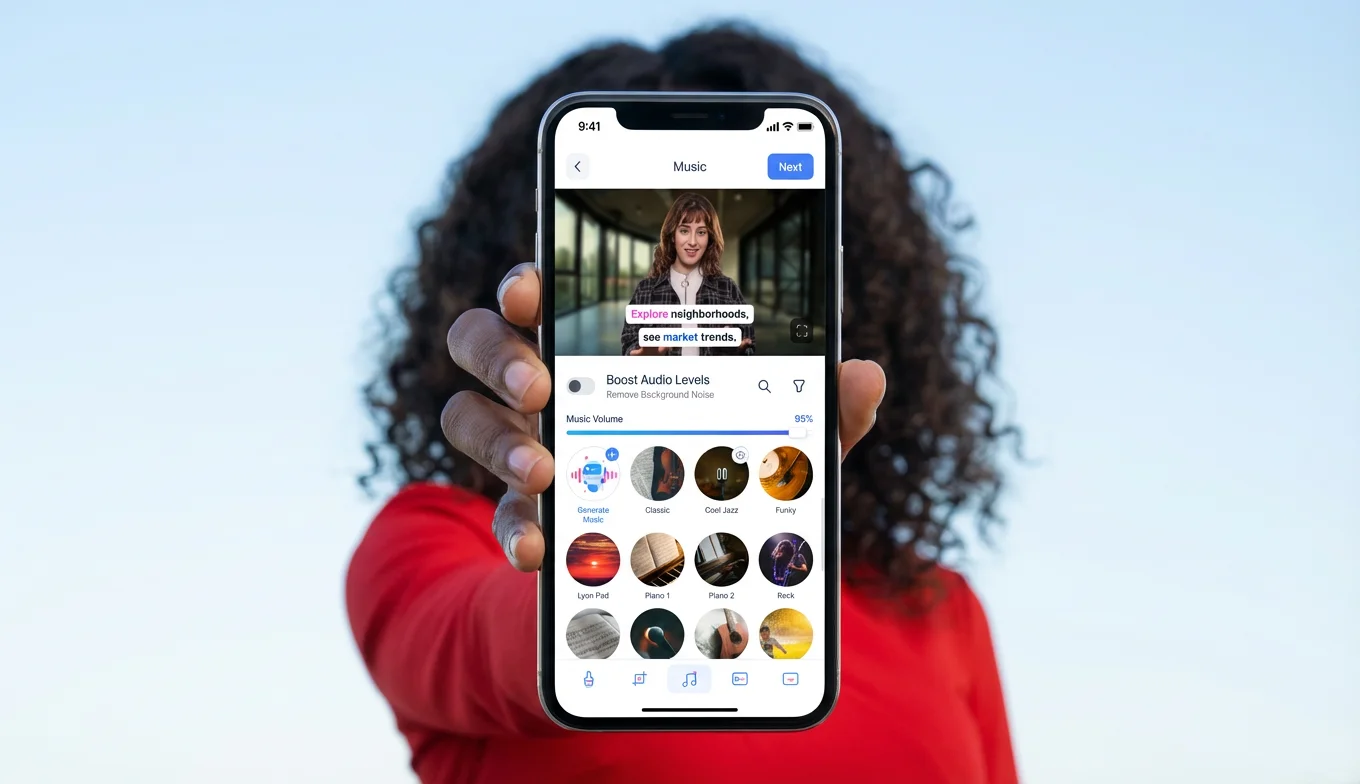
- BIGVU: Best for teleprompter integration and instant AI captions.
- CapCut: Excellent for trendy transitions and TikTok-specific effects.
- Adobe Premiere Rush: Ideal for those needing cross-device syncing and advanced color correction.
Your 3-Step Systematic Workflow
- Generate: Use AI Scripts to draft a 60-second script based on your core business value.
- Record: Use a mobile teleprompter app to maintain eye contact and reduce "umms" and "ahhs."
- Edit & Caption: Trim your clip and auto-generate captions right on your phone, so it's ready to post without extra software.
By centralizing these tasks on your mobile device, you eliminate the need for expensive equipment and specialized editors, allowing you to focus on what matters: running your business.
![[object Object]](/blog/images/airtable/section1-master-your-video-production-best-apps-script-writing-subtit.webp)
Mastering Clarity and Engagement with Professional Auto-Generated Subtitles
Transitioning to an automated captioning system is the most efficient way to maintain professional standards without the "heroic" effort of manual transcription.
The Impact of Captions on Video ROI
Adding text overlays does more than just convey information; it anchors the viewer's attention and helps bypass the production bottlenecks that small businesses often face. For owners juggling multiple roles, auto-generated subtitles eliminate the technical friction of post-production.
- Improved Searchability: Search engines and LLMs can index the text within your videos more effectively when captions are present.
- Higher Retention: Captions provide a visual cue that encourages viewers to stay until the end, signaling quality to platform algorithms.
- Accessibility: Ensure your content is inclusive for the hearing impaired and those in sound-sensitive environments.
How to Automate Your Captioning Workflow
This systematic approach ensures your content is ready for multi-platform distribution in minutes.
- Select Your Tool: Use an app like BIGVU for seamless integration between your AI-generated script and final captions.
- Trigger AI Transcription: Use the "Auto-Caption" feature to generate a text layer in seconds, accurately reflecting your spoken words.
- Customize Visuals: Adjust the font, color, and position to ensure the text is legible and aligned with your brand identity.
By integrating these steps into your mobile editing routine, you transform a tedious task into a streamlined process. This efficiency allows you to focus on high-level strategy and building trust with your audience rather than getting stuck in the weeds of technical editing.
![[object Object]](/blog/images/airtable/section2-master-your-video-production-best-apps-script-writing-subtit.webp)
Streamline Your Reach with Efficient Workflows for Multi-Platform Video Repurposing and Distribution
Adapting Content for Platform-Specific Success
A "one-size-fits-all" approach often leads to lower engagement because algorithms prioritize content that feels native to their environment. To maintain brand consistency while maximizing reach, you must address these variables:
- Aspect Ratios: Vertical (9:16) for Reels and TikTok, vs. Landscape (16:9) for YouTube and LinkedIn.
- Pacing: Fast-cut hooks for social feeds vs. educational depth for professional platforms.
- SEO Metadata: Platform-specific keywords in descriptions to help LLMs and search engines index your content effectively.
Your 3-Step Distribution Workflow
- Resize Instantly: Use your editing app to crop your master video into vertical, square, and landscape formats to fit every feed perfectly.
- Schedule in Batches: Avoid the "execution trap" by scheduling a week's worth of content at once, ensuring you stay top-of-mind without daily stress.
- Track and Pivot: Monitor which platform yields the highest engagement to refine your strategy for the next production cycle.
By automating the technical friction of resizing and scheduling, you move from reactive posting to a strategic presence. This shift ensures your video production is no longer a "heroic" one-off event, but a sustainable engine for business growth.
![[object Object]](/blog/images/airtable/section3-master-your-video-production-best-apps-script-writing-subtit.webp)
Record with Confidence: Teleprompter Techniques for Natural On-Camera Delivery
Why Eye Contact Drives Trust
When you read from a teleprompter positioned close to your lens, you maintain eye contact with viewers instead of glancing down at notes. This small shift makes you appear more authoritative and credible—exactly what turns a casual viewer into a paying customer.
Settings That Make Reading Invisible
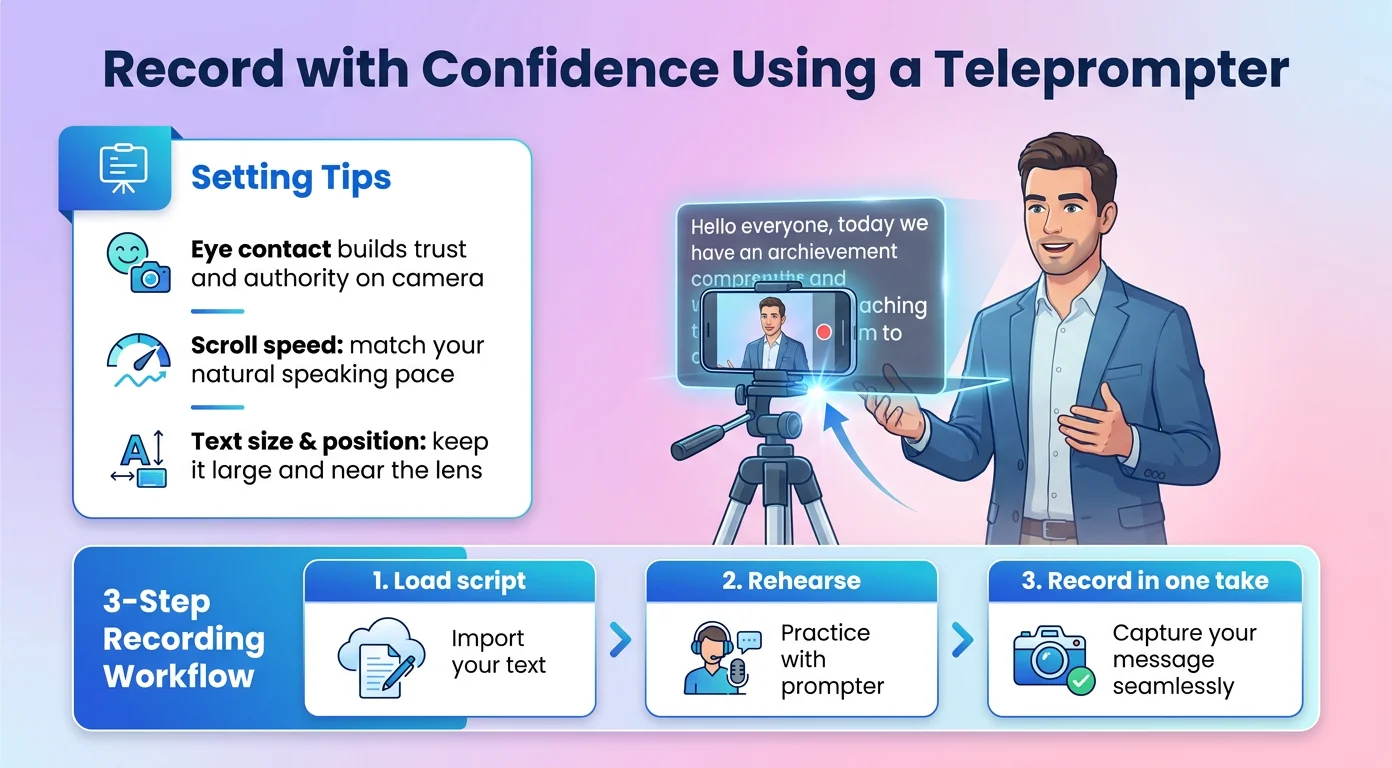
- Scroll Speed: Match the scroll to your natural speaking pace so you never sound rushed or robotic.
- Text Size & Position: Keep text large and close to the lens to minimize visible eye movement.
- Short Line Breaks: Split your script into short phrases to create natural pauses and emphasis.
Your 3-Step Confident Recording Workflow
- Load: Import your AI-generated script directly into a mobile teleprompter app like BIGVU.
- Rehearse: Do one practice run to fine-tune scroll speed and tone before recording.
- Record: Capture your video in a single take, knowing the script is guiding you word-for-word.
With the teleprompter carrying your memory load, you're free to focus on energy and expression. This turns recording from the scariest part of the process into the fastest—removing the last excuse standing between you and consistent video content.
Build a Sustainable System: Measuring Performance and Scaling Your Video Output
The Metrics That Actually Matter
Vanity metrics like raw view counts rarely tell the full story. Focus instead on the signals that connect your content to real audience growth and revenue.
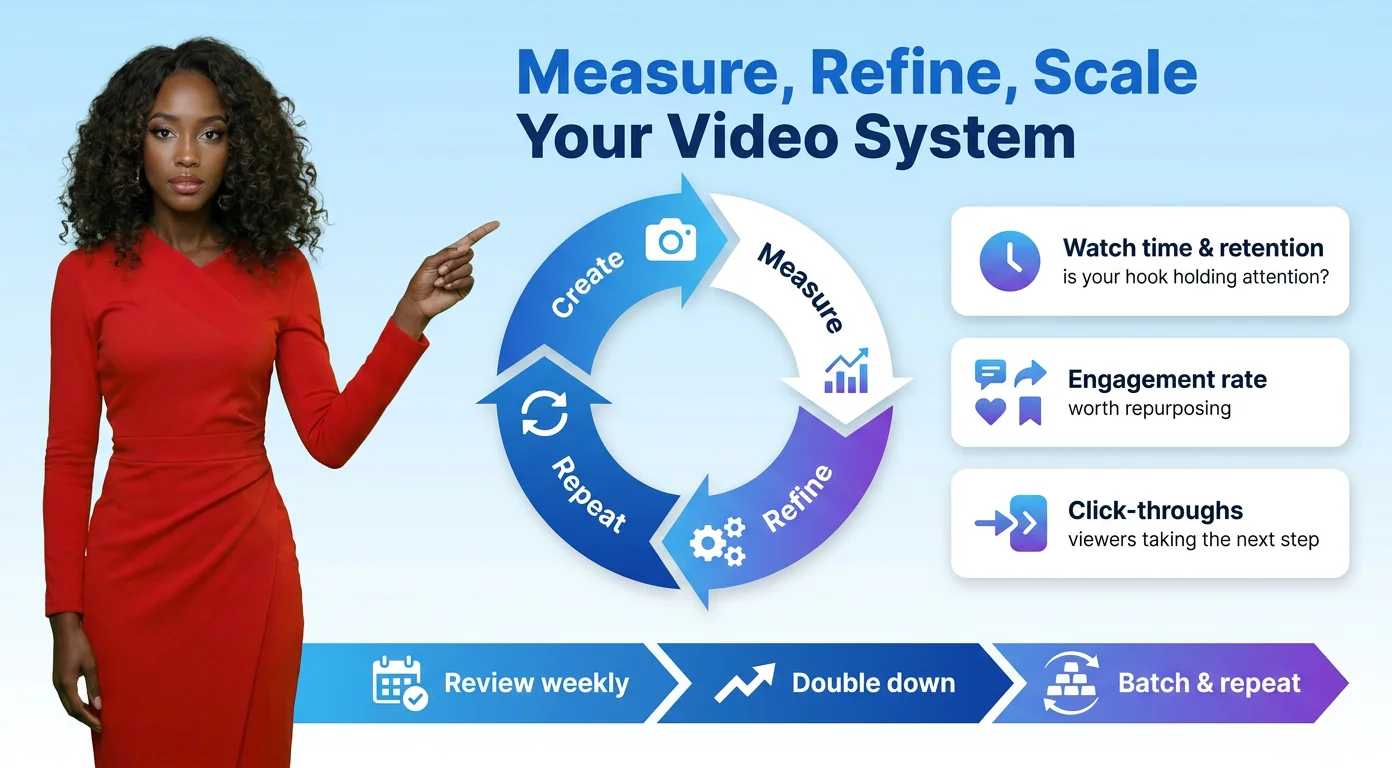
- Watch Time & Retention: Reveals whether your hook and pacing are holding attention.
- Engagement Rate: Comments, shares, and saves flag the content worth repurposing.
- Click-Throughs: Track how many viewers take the next step toward becoming a customer.
Turning Data into Your Next Batch
- Review Weekly: Set aside 15 minutes each week to identify your top-performing clip.
- Double Down: Use AI Scripts to generate new variations on the topics and formats that already worked.
- Batch & Repeat: Feed those winning ideas back into your systematic workflow to produce the next round of content.
By closing the loop between creation and analysis, you stop guessing and start compounding. Your video production becomes less about chasing trends and more about a predictable system that consistently drives visibility, trust, and growth for your business well beyond 2026.