Email Attachment Limits in 2026, and Why Your Video Bounces
Here is what each provider says today:
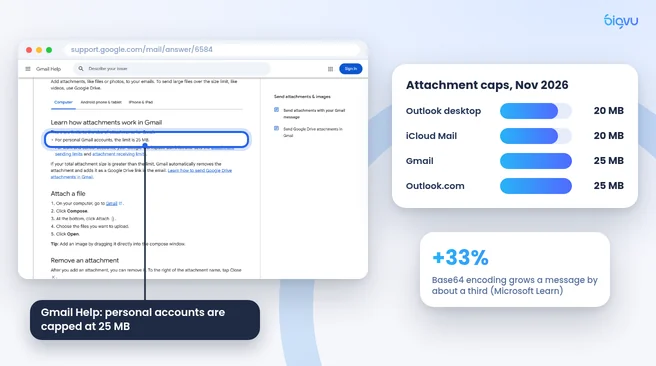
- Gmail: Google's help page says that for personal accounts "the limit is 25 MB." Work and school limits are set by the Google Workspace administrator.
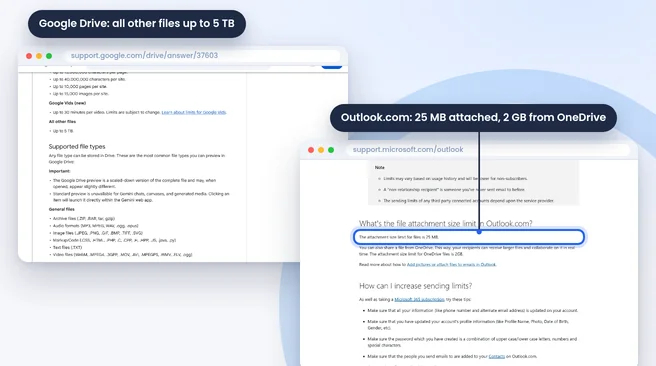
- Outlook.com: Microsoft's sending limits page lists 25 MB for attached files and 2 GB for files shared from OneDrive.
- Outlook desktop app: according to Microsoft Learn, Outlook 2013 and later default to 20 MB for internet accounts (POP3, IMAP) and 10 MB for Exchange mailboxes unless an administrator changes it.
- iCloud Mail: Apple lists 20 MB per message, or up to 5 GB with Mail Drop turned on.
There is a second, hidden squeeze. Attachments are converted to text before they travel, and Microsoft's Exchange documentation notes that this Base64 encoding "increases the size of the message by approximately 33%." A file that looks like it fits on your desktop can still be rejected by the server, and the recipient's provider applies its own limit as well.
Does email lower the quality of a video? An attachment arrives as the same file you sent. Quality is lost when people compress, trim or downscale a video to squeeze under the cap. That is why the five methods below send a link to the original file instead.
Methods 1 and 2: Cloud Links in Gmail and Outlook
Method 1: Google Drive inside Gmail
If you attach something larger than 25 MB in Gmail, Google says Gmail "automatically removes the attachment and adds it as a Google Drive link in the email." You can also click the Drive icon in the compose window and pick a file you already uploaded. According to Google Drive Help, video files can be up to 5 TB, so the real limit is your storage plan.
Before you send, set sharing to "Anyone with the link" or add the recipient's address. Otherwise they will see a request access screen instead of your video.
Method 2: OneDrive inside Outlook
In Outlook, choose to share the file as a OneDrive link instead of attaching a copy. Microsoft allows OneDrive files up to 2 GB from Outlook.com, which covers most marketing videos, client updates and screen recordings.
Both methods keep the original file untouched. The recipient can stream a preview in the browser or download the full resolution version.
Method 3: Mail Drop on iPhone and Mac
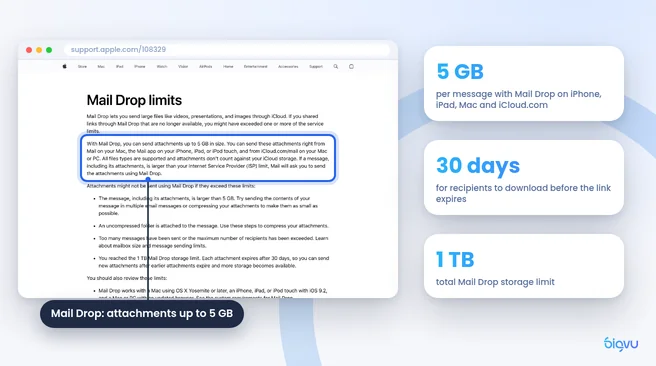
Apple users have a built in option. Apple's Mail Drop page says you can "send attachments up to 5 GB in size" from Mail on a Mac, the Mail app on iPhone or iPad, and iCloud.com. Files are uploaded to iCloud, and they don't count against your iCloud storage.
To send a video from iPhone: open Photos, pick the video, tap Share, then Mail. Write your message and tap Send. If the file is too big for a normal attachment, Mail offers to use Mail Drop. Tap it and the recipient gets a download link.
A few limits to know, all from Apple:
- Recipients have 30 days to download the file before the link expires.
- The total Mail Drop storage limit is 1 TB.
- Uncompressed folders cannot be sent, so zip a folder of clips first.
Mail Drop works with any recipient, including Gmail and Outlook users, which makes it the simplest choice if you shoot and send from an iPhone.
Method 4: Dropbox and WeTransfer for Big Files
When a file is too large to upload to email at all, a dedicated storage or transfer service is the next step.
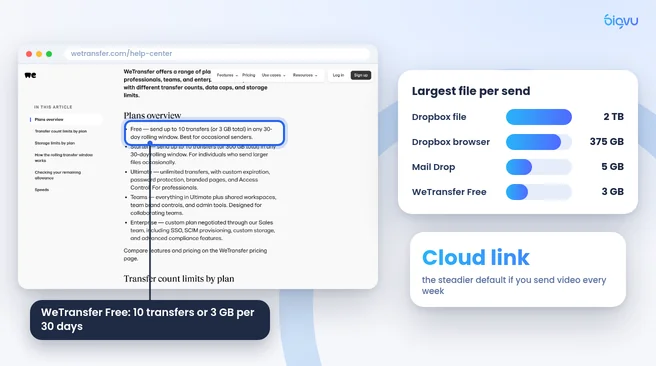
Dropbox accepts single files up to 2 TB, according to Dropbox Help, but it warns that uploads over 375 GB in a web browser may time out, and recommends the desktop app for very large files. To upload, log in to dropbox.com, click Upload, choose the file, then click Share and copy the link into your email.
WeTransfer needs no shared folder at all. Its plan limits page (vendor data) says the free plan lets you "send up to 10 transfers (or 3 GB total) in any 30 day rolling window." Paid plans raise that limit.
Remote video editor Hamed Derakhshani gives the same advice to his clients in a guide to preparing footage: "Don't send files as email attachments. Use tools built for large transfers and collaboration." He suggests Google Drive or Dropbox for organized project folders and WeTransfer for one time deliveries.
A fair counterpoint: free transfer tiers have become stricter over time, and a quota of 3 GB a month runs out quickly with 4K footage. If you send video every week, a cloud folder you already pay for is the more reliable default, and transfer services work best for the occasional delivery.
Method 5: Send a Video Email Page Instead of a File
Sometimes the goal is not to hand over a file but to get someone to watch. A sales follow up, a property tour or a client update works better as a video the recipient can play with one click.
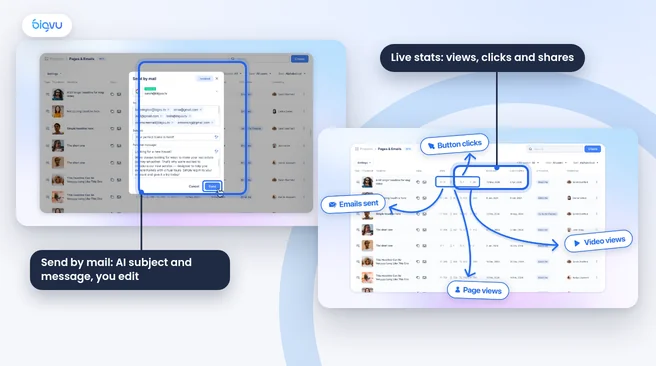
That is what BIGVU video email does. You record with the BIGVU teleprompter or create a video with an AI avatar, and BIGVU builds a branded landing page for it. According to the BIGVU tutorial, the email goes out "with the video as an animated GIF thumbnail, a Watch Video CTA and your personal message," and the dashboard then shows views, clicks and shares, so you can see who watched.
Because the video plays on a web page, the email itself stays small and lands in any inbox. BIGVU also writes a suggested subject line and message based on the video, which you can edit.
Two honest limits. First, video emails are part of the AI Pro plan and above on the BIGVU pricing page (AI Pro is $19 a month); the Free plan includes the teleprompter and 500 AI credits a month, with 720p watermarked video. Second, the recipient watches a hosted video rather than receiving your original file, so if an editor needs your raw footage, use Drive, Dropbox or WeTransfer instead.
For a deeper comparison of video email tools, see our guide to BombBomb, Sendspark and BIGVU.