

The Vlogging Gear You Need on Day One (It Fits in a Drawer)
Ask a room full of working videographers what a small business should buy first and you will hear the same answer again and again. In a long r/videography thread where a shop owner asked how to make better engagement videos, the professionals barely talked about cameras. They talked about light and sound, and they suggested a phone, a tripod, and a pair of wireless lavalier mics as a perfectly good kit.
That matches what you see from people who vlog for a living. Vanessa Lau, who built her audience on YouTube, says in her beginner vlogging guide that her iPhone is still her main vlogging camera because it is the one device she always has with her. She records on the back camera, set to 4K at 30 frames per second, and only switches to a dedicated pocket camera when she wants to save phone storage.
The starter kit
- Your phone. Use the rear camera whenever you can. It is almost always sharper than the selfie lens.
- A clip on microphone. This is the upgrade that viewers notice most. A small wireless transmitter clipped to your shirt removes the echo and fridge hum that the built in mic picks up.
- A tripod. Anything that holds the phone still at eye level. A stack of books works on day one.
- A teleprompter app. It lets you keep your notes next to the lens instead of glancing down at a piece of paper.
What can wait
Mirrorless cameras, gimbals, softboxes, and a second monitor are all nice, and none of them will make your first ten vlogs better. Viewers forgive slightly soft video. They do not sit through muffled, echoing audio. Spend on sound first, light second, and leave the camera upgrade for the day your vlog is already a habit.
One more piece of gear is not physical at all. The friction in business vlogging usually lives in the workflow: writing the script, reading it naturally, editing out the stumbles, and making each video look like it came from the same company. That is where good AI video tools earn their place, and we will come back to them in the last section.
![[object Object]](/blog/images/airtable/section1-master-vlogging-with-bigvu-professional-lighting-and.webp)
Lighting Your Vlog With a Window or a Single Light
Good lighting is less about how much light you have and more about where it comes from. The rule that fixes most beginner footage is short: light your face, not the room, and never sit with the brightest thing in the scene behind you.
Start with a window
Turn your desk so a window is in front of you, slightly off to one side, with the phone between you and the glass. Daylight coming through a window is big and soft, which is exactly what expensive studio boxes try to imitate. If the sun is shining straight in, hang a thin white sheet over the glass to diffuse it.
The catch is that daylight moves. Record three videos between ten and two and they will not match. That is fine when you are starting out, and it is the main reason to buy a light later.
Adding one light
In a home lighting tutorial from Riverside, the host walks through a full three point setup with a key light, a fill light, and a hair light, then switches everything off and shows what a single small LED panel can do. The verdict is that one modest light, placed well, still makes a big difference. Placement is the whole trick. With the light at eye level, it bounces straight off the host's glasses. Raised above head height and angled down at roughly 45 degrees, the reflection disappears and the face gets gentle shape instead of flat glare.
Two more tips from that video are worth stealing. Run your lights at low intensity first, because a panel at full power draws hard lines across the face. And keep every light at the same color temperature. A warm desk lamp mixed with cool daylight makes skin look slightly ill, and the camera will keep trying to correct for it.
Ring light or panel?
Ring lights are popular because they are easy, and they do give you even light on demand. Our guide to using a ring light with a stand covers that setup in detail. The trade off is a flatter look and a bright circle in anyone's glasses. Heights Digital Media, a production company that films business owners, recommends a soft panel about 45 degrees to one side and a little above eye level for a more natural result, plus a small lamp behind you, out of frame, to separate you from the wall.
Three things to switch off
- The window behind you, which turns you into a silhouette.
- Overhead ceiling lights on their own, which carve shadows under your eyes.
- Any lamp with a different color bulb from your main light.
![[object Object]](/blog/images/airtable/section2-master-vlogging-with-bigvu-professional-lighting-and.webp)
Looking Natural on Camera: Framing, Delivery, and the Awkward Phase
The real blocker for most business owners is not technical. It is the feeling of talking to a lens while everyone in the next room can hear you. Vanessa Lau admits she used to hate vlogging, and her advice for that stage is refreshingly practical. Start privately. Record at home, where nobody is watching, and do not post the first clips at all if you are not ready. And stop comparing your first vlog to someone else's hundredth.
Frame it like a pro
- Put the lens at eye level. Looking down at a phone on the desk reads as casual in the wrong way.
- Place your eyes about a third of the way down the frame, with your chest at the bottom edge.
- Step a few feet away from the wall so the shot has some depth.
- Show something that says what you do, like your shop, your tools, or your shelf of client work, and clear away everything else.
- Lock focus and exposure by pressing and holding on your face, so the picture does not pulse brighter and darker as you move.
Use the teleprompter as a guide, not a script
A word for word script read off a screen tends to sound like a script read off a screen. Heights Digital suggests writing three to five short bullet points, scripting only your opening line, and talking naturally through the rest. The BIGVU teleprompter works well for this. It scrolls your notes right next to the lens, so your eyes stay on the viewer, and you can slow the scroll speed down until you stop chasing the text.
Two delivery habits help more than any setting. Skip the "hi, my name is" opener and start in the middle of the thought, with the problem or the answer. Then lift your energy a notch above what feels normal, because a camera flattens everyone. If a take falls apart, stop, pause for a second, and start that line again. Short takes are easier to nail and much easier to edit.
![[object Object]](/blog/images/airtable/section3-master-vlogging-with-bigvu-professional-lighting-and.webp)
A Storytelling Framework for Business Vlogs: Hook, Story, Takeaway
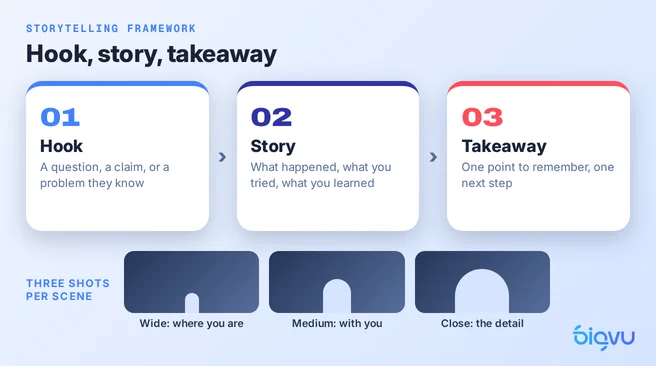
Good gear makes a vlog watchable. Structure is what makes someone stay until the end and remember who you are. Most business vlogs drift toward one of two failures: the unfocused ramble that starts with "so today I wanted to talk about a few things," or the stiff lecture that sounds like a slide deck read aloud. The fix is a three part shape you can reuse for a sixty second Reel or a ten minute YouTube video.
The hook
Your first sentence has one job, which is to give people a reason to keep watching. A sharp question, a surprising claim, or a problem your customer will recognize instantly. "A customer returned the same lamp three times, and the reason changed how we pack every order" is a hook. "Welcome back to the channel" is not.
The story
This is the middle, where the value lives. Instead of listing tips, put them inside something that happened. What went wrong, what you tried, what you learned. People remember a short story far longer than a list of bullet points, and stories are where personal branding actually takes hold, because they show how you think.
If you are filming around your day rather than at a desk, borrow Vanessa Lau's rule for each scene: capture a wide shot so viewers see where you are, a medium shot so they feel like they are with you, and a close up so they see the detail. Three angles give you enough variety to cut a story together later. When you add voiceover, talk about what you were thinking and why it mattered. The viewer can already see what you did.
The takeaway
Close with the one thing you want people to remember and one clear next step. Try the tip, book a call, reply with a question. One ask, not four.
You do not need to invent this structure from a blank page each week. A video script generator can lay out the hook, the story beats, and the close from a topic and a few notes about what happened. BIGVU's AI script writer does exactly this. You edit the draft until it sounds like you, trim it to bullets if you prefer, and send it straight to the teleprompter.
A Weekly Vlogging Workflow That Fits Into One Afternoon
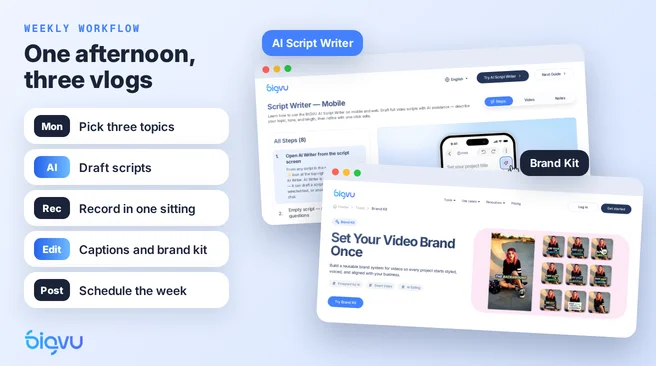
The businesses that keep vlogging are rarely the ones with the best equipment. They are the ones that made the process boring and repeatable. Here is a rhythm that works for a solo owner.
- Pick three topics on Monday. Pull them from questions customers asked that week. If you are stuck, this list of vlogging ideas for beginners will get you moving.
- Draft the scripts. Run each topic through an AI script writer, then rewrite any line that does not sound like you. This is the step where AI for small business saves the most time, because the blank page is what stops most people.
- Record all three in one sitting. Lights on once, mic clipped once, teleprompter loaded. Batching keeps your look identical across the week.
- Edit and brand. Cut the pauses and filler, add captions, and apply your logo and colors.
- Schedule. Spread the three vlogs across the week so you are not scrambling on Thursday night.
Why brand consistency belongs in the workflow
Video branding is what lets someone recognize your vlog with the sound off, halfway through a scroll. The same caption style, the same colors, the same logo in the same corner. Doing that by hand on every video is tedious, so most people stop doing it. A brand kit stores your logo, fonts, and colors once and applies them to every export, which makes brand consistency the default rather than a chore.
Choosing your tools
A general editor can handle part of this. When our team tested the free tier of the CapCut web editor, templates applied in one click and exports went up to 1080p without a paywall, but auto captions carried a Pro badge and upgrade prompts kept appearing while we worked. That is fine if editing is all you need. The advantage of BIGVU is that the script, the teleprompter, the AI editing, captions, and the brand kit live in one app, so the whole loop from idea to published vlog happens in one place.
Whatever you choose, judge the setup by one question: does it make next week's vlog easier than this week's? If it does, you will keep going, and consistency is where video marketing for a small business starts to pay off.