How we tested: methodology, source images, and tools covered
Every tool was tested with the same three source images: a professional headshot against a neutral background, an outdoor landscape photo, and a product shot. For talking photo tools, we used a single 30-second script delivered to every platform — same text, same image — so outputs could be compared directly.
What we scored
We evaluated each tool on five dimensions. Output quality covers how realistic and usable the result looks — specifically whether facial movement, skin texture, and hair respond naturally, or whether the uncanny valley kicks in. Lip-sync accuracy applies only to talking photo tools and measures whether mouth movement matches the audio at normal viewing speed. Free tier generosity covers how many generations you actually get without paying and whether outputs carry a visible watermark. Processing speed measures time from upload to downloadable result. Ease of use covers whether a first-time user can produce a finished output in under ten minutes.
The eight tools we tested
The talking photo category includes BIGVU Portrait to Video, Hedra, HeyGen, and D-ID. These tools animate a still image to deliver spoken content with lip sync — the primary use case is talking head videos without recording yourself. The motion and animation category includes Runway Gen-3, Pika, Kling AI, and Luma Dream Machine. These tools add movement, cinematic effects, and scene animation to images — the primary use case is creative video content, social media, and visual storytelling.
We focused on free tier performance because that's where most people start. Every tool in this list offers some level of free access, though the limits vary widely.
![[object Object]](/blog/images/airtable/section1-best-free-ai-image-video-generators-2026-tested-ranked.webp)
Talking photo generators: BIGVU, Hedra, HeyGen, and D-ID compared
Talking photo tools are the most practically useful category for business content creators. The core promise — animate a still photo to deliver a scripted message with realistic lip sync — removes the camera barrier entirely. Here's how the four main tools compare.
BIGVU Portrait to Video
BIGVU's Portrait to Video (powered by OmniHuman technology) produced the most consistently natural output across all three test headshots. Facial movement was fluid, head bobbing felt organic rather than mechanical, and lip sync held up at 1x and even 1.25x playback speed. Skin texture and hair didn't exhibit the smearing artifact that appeared in several competitor outputs.
The differentiator isn't just output quality — it's what happens after the generation. BIGVU is the only talking photo tool that connects directly to a complete production workflow: AI Script Generator to write the content before you generate, automatic captions burned into the video, Brand Kit to apply logo and colors in one tap, and Video Email integration to send the finished video from Gmail or Outlook with watch-time tracking. No other talking photo tool in this comparison offers any of this. You can generate a talking photo, add captions, brand it, and send it as a tracked video email without opening a second app.
Free tier: BIGVU's free plan includes access to Portrait to Video alongside the teleprompter, basic editing, and caption tools. No watermark on standard exports.
Hedra
Hedra produced strong talking photo results — the second-best in this category. Facial expressions were more animated than BIGVU's in some cases, though this occasionally crossed into exaggerated territory depending on the source image. Lip sync was accurate on shorter scripts but occasionally drifted on 30-second clips. The biggest limitation is the workflow dead end: Hedra generates a video file and stops there. No scripting tools, no editing, no captions, no branding, no publishing. You're downloading an MP4 and starting over in another app.
Free tier: limited monthly generation credits. Outputs include a Hedra watermark on the free plan.
HeyGen
HeyGen's avatar quality is polished and consistent, and its translation/dubbing features are genuinely best-in-class for multilingual content. If you need a talking head video in eight languages, HeyGen is the tool. For English-only, single-language content, the output quality is comparable to BIGVU and Hedra but the workflow is heavier and the pricing is structured for enterprise teams rather than individual creators or small businesses.
Free tier: 1 free video per month, maximum 1 minute. Watermark on free outputs. The free tier is essentially a demo, not a working tool.
D-ID
D-ID was the weakest talking photo performer in this group. Lip sync was acceptable on slow-paced scripts but broke down noticeably on natural speech rhythm. The facial movement felt stiff — heads moved in ways that felt calculated rather than natural. Output quality has improved since earlier versions, but it remains a noticeable step behind BIGVU and Hedra. The free tier offers 5 trial videos, which is enough to evaluate but not enough to produce finished content.
Free tier: 5 trial videos included. Watermark on free outputs.
![[object Object]](/blog/images/airtable/section2-best-free-ai-image-video-generators-2026-tested-ranked.webp)
Motion and animation generators: Runway, Pika, Kling AI, and Luma compared
Motion and animation tools serve a different purpose than talking photo generators. They don't produce speech or lip sync — they add cinematic movement, atmospheric effects, and scene animation to still images. The use cases are creative video content, social media, and visual storytelling rather than business communication.
Runway Gen-3
Runway produced the most visually striking results in this category. Camera movements felt cinematic, lighting effects responded realistically to the source image, and the motion on our landscape photo was genuinely impressive — water moved, clouds shifted, and the overall result looked like a high-end stock footage clip. For creators making artistic or editorial content, Runway is still the benchmark.
The practical limitation is the free tier: 125 credits total, with no monthly refresh. A standard 4-second clip at 720p costs approximately 5 credits — so the free tier gets you around 25 short clips before you hit a paywall. There's no talking photo functionality, and outputs carry a Runway watermark on the free plan.
Pika
Pika's output quality sits below Runway's but the free tier is more practical: 150 generation credits per month that refresh, making it a workable tool for ongoing creative content. Motion effects on product shots and headshots were smooth. The interface is one of the most beginner-friendly in this category. Pika also introduced a lip sync feature in recent updates, though the quality falls significantly short of dedicated talking photo tools like BIGVU and Hedra.
Free tier: 150 credits/month with refresh. Watermark on free outputs. Best free-tier value in the motion category.
Kling AI
Kling AI impressed with motion realism — particularly on the headshot image where fabric movement and subtle facial micro-expressions were rendered more naturally than Runway in some test cases. Regional availability varies (the platform originated in China and international access can be inconsistent), which limits how reliably you can build it into a workflow. The free tier offers a daily credit allowance rather than a monthly pool.
Free tier: daily credits, no watermark on standard exports. Output resolution capped at 720p on free plan.
Luma Dream Machine
Luma specializes in dreamlike, atmospheric motion effects — slow zooms, ethereal lighting shifts, soft movement that feels more like a mood piece than a scene. On the landscape photo, the output was beautiful. On the headshot, the facial movement looked unsettling. Luma is not designed for people-focused content, and this showed clearly in testing. It's a strong choice for abstract, atmospheric, or product-focused creative content and a poor choice for anything involving faces.
Free tier: 30 free generations per month. No watermark on standard exports at 720p.
![[object Object]](/blog/images/airtable/section3-best-free-ai-image-video-generators-2026-tested-ranked.webp)
How to choose: use case guide and free tier comparison
The right tool depends entirely on what you're making. Here's a direct decision guide followed by a free tier comparison.
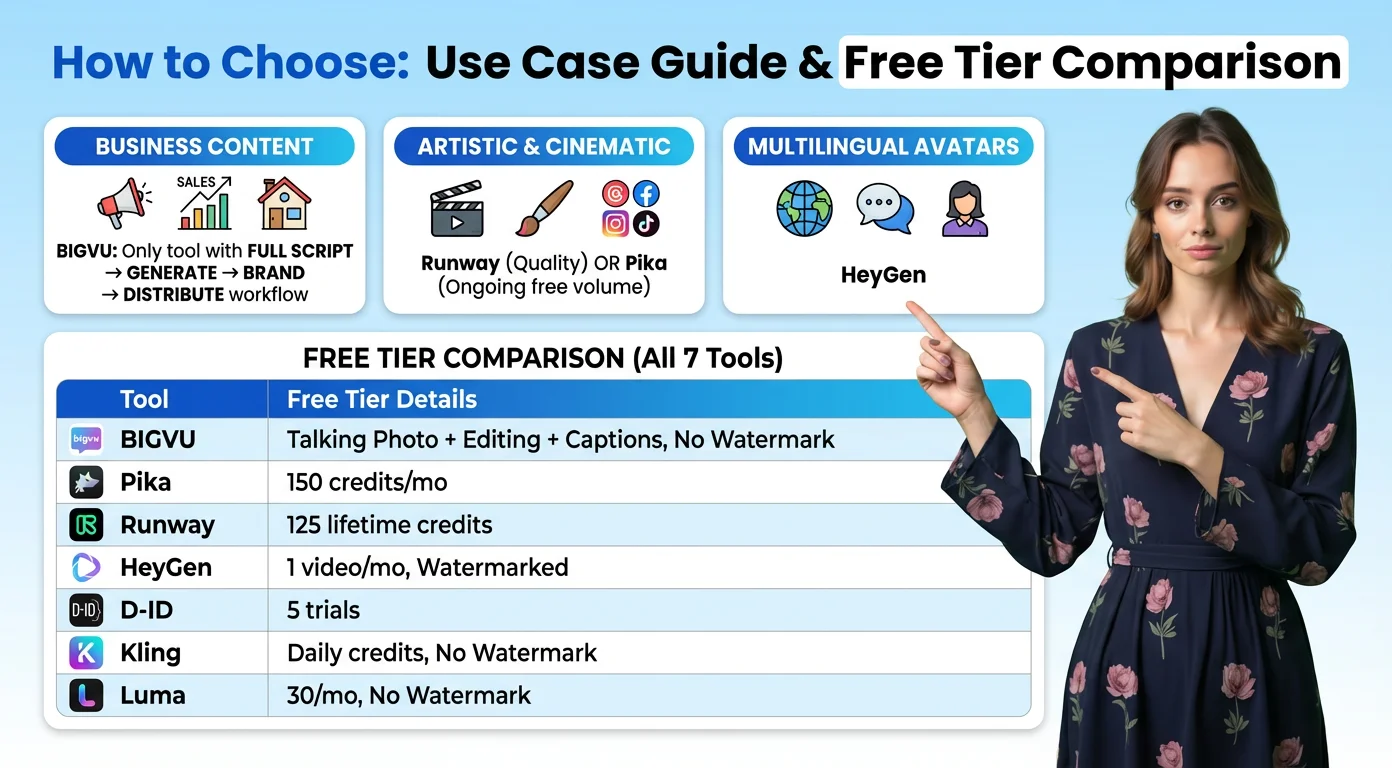
If you're creating business content — sales videos, social media, real estate, coaching
BIGVU is the only tool in this comparison that covers the full workflow. Other talking photo generators produce a video file and leave you to figure out the rest. BIGVU generates the talking photo, lets you add burned-in captions, apply your Brand Kit, and send the video as a tracked email — all without switching apps. The AI Script Generator means you can write, generate, brand, and distribute from a single platform. This is the tool for anyone whose end goal is a professional, publishable video rather than a raw generated file.
If you're creating artistic, cinematic, or social media content
Runway for quality, Pika for ongoing volume on a free plan. Runway's outputs are the most visually impressive in the motion category, but the free tier depletes quickly. Pika's monthly credit refresh makes it more practical if you're producing content regularly without a paid subscription.
If you need multilingual or enterprise avatar content
HeyGen leads in translation and dubbing quality. The pricing is enterprise-oriented but justified for global teams producing localized content at scale.
Free tier comparison at a glance
BIGVU offers the most complete free tier in the talking photo category — talking photo access, editing tools, captions, and no watermark on standard exports. Pika offers the most useful free tier in the motion category with 150 refreshing monthly credits. Runway's 125 lifetime credits make it difficult to evaluate thoroughly without paying. HeyGen's free tier (1 video per month, watermarked) is effectively a product demo rather than a working tool. D-ID gives 5 trial videos. Kling AI offers daily credits with no watermark. Luma provides 30 free generations monthly at 720p.
One practical note: these tools complement rather than compete with each other. A business creator might use BIGVU for talking photo sales content and Pika for animated social posts using product images. The workflows don't overlap.
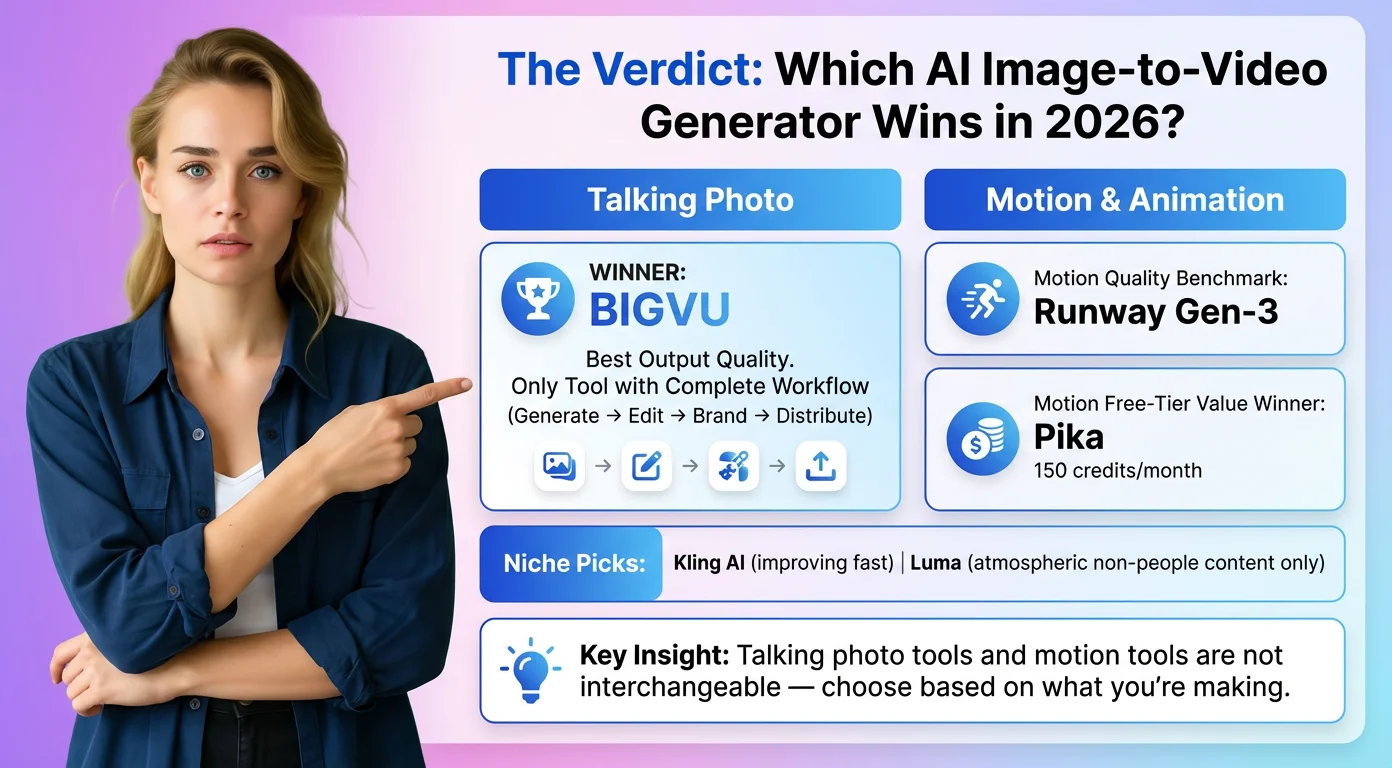
The verdict: which AI image-to-video generator wins in 2026?
For talking photo content — the category most relevant to business creators, marketers, coaches, and real estate professionals — BIGVU Portrait to Video is the strongest option in 2026. The output quality leads the field on natural facial movement and lip-sync consistency, and it's the only tool here that connects generation directly to editing, branding, and distribution. No other talking photo tool offers anything close to the complete workflow.
For motion and animation content, Runway sets the quality benchmark and Pika provides the best ongoing value on a free plan. Kling AI is worth watching as international availability improves. Luma is a niche tool best suited to atmospheric, non-people content.
The most important framing: talking photo tools and motion tools aren't interchangeable. A Runway output can't replace a BIGVU talking head. A BIGVU portrait video isn't designed to compete with Runway's cinematic landscape animation. Choose based on what you're actually making — and if you're making business video content, start with BIGVU's free plan before spending anything elsewhere.