

What OpusClip Does in 2026 (and What Changed With OpusClip 4.0)
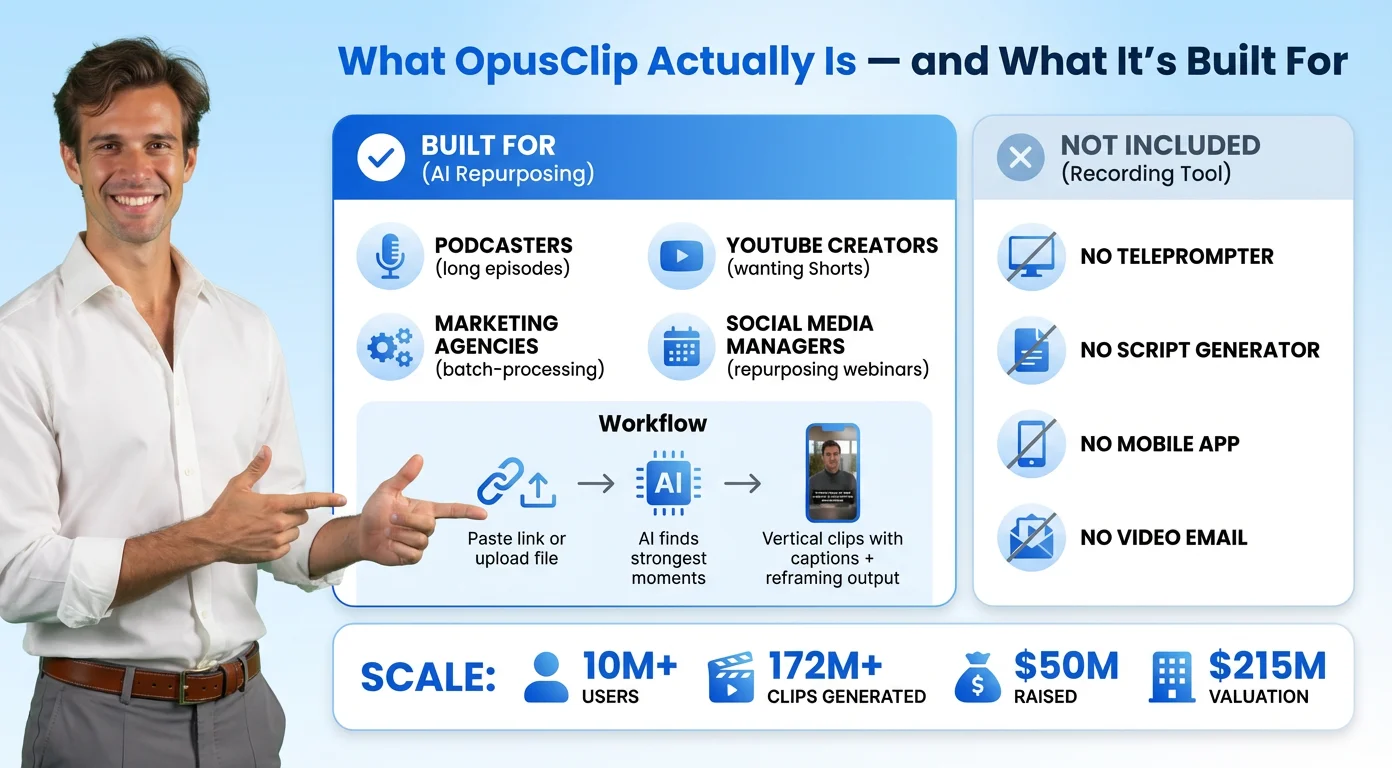
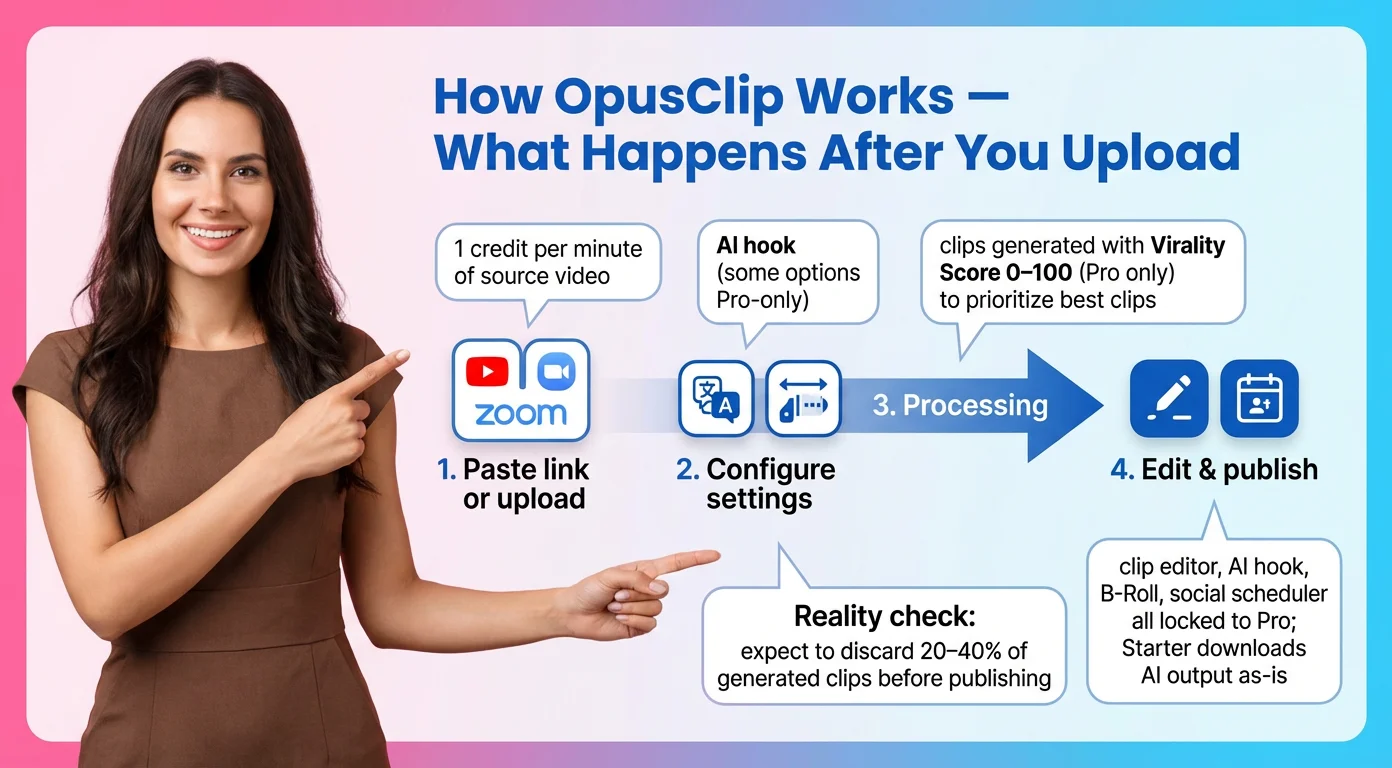
At its core, OpusClip is an AI video tool for content repurposing. You upload a file or paste a link to a podcast, webinar, interview or YouTube episode. The AI picks out moments it thinks will work as shorts, reframes them to vertical, adds animated captions and gives each clip a Virality Score. You review, tweak and export, or post straight to TikTok, YouTube Shorts and Instagram Reels from inside the app.
Two things have changed since most reviews were written.
There is now a mobile app. Older articles, including an earlier version of this one, said OpusClip was web only. That is no longer true. The OpusClip iPhone app is on the App Store, and the company's help center lists what it still leaves out: no Google Drive import, no XML export to Premiere Pro or DaVinci Resolve, no AI B roll, and no creating or changing brand templates. The YouTube reviewer Wacky Creator put it more bluntly in March 2026: on the phone "you can basically trim the beginning and the end, maybe change the subtitle styling". Treat the app as a way to review and post, not to edit.
OpusClip 4.0 moved into editing. On November 2, 2026, cofounder and CEO Young Zhao announced OpusClip 4.0. The headline feature is Auto edit, "built for talking videos": drop in raw footage, switch on speech cleanup, captions and B roll, and "what comes back is a finished video." It also adds Recipes (saved editing setups), a Viral Hook template library, Motion Graphics, and an AI Producer plugin for people who already work in ChatGPT or Claude. Separately, the company runs Agent Opus, which generates AI videos from a script or idea and offers 90 free credits with no card required.
That is a real shift. OpusClip used to need a finished long video before it could help. With 4.0 it wants your raw takes too. We have not tested Auto edit yet, so everything below about quality refers to the clipping engine, which is still what most people pay for.
Does OpusClip Really Work? What Our Test and Independent Reviews Found
Our own test was small on purpose. We wanted to see the free plan exactly as a new user does. After Google sign in, OpusClip showed a free trial popup, a five step survey and an offer to auto import a YouTube channel. The dashboard then showed 90 credits. We pasted a YouTube link to a video of about 19 seconds. It cost 1 credit, took about four and a half minutes, and returned one clip of 17.08 seconds with a Virality Score of 94 and an AI written hook title.
The editor was the pleasant surprise. Captions are fixed by editing the transcript, so when we changed one word, the caption on the video updated instantly. The Karaoke caption preset highlights each spoken word as it plays. "Download HD" worked on the free plan and gave us a 1080x1920 MP4, but with an OpusClip watermark burned into the top left corner. Removing it was the only paywall we hit. One caveat: the pricing page lists the Free plan as "No editing", so our new account was most likely still inside a trial window when the editor worked for us.
A single short video cannot tell you how the AI handles a 60 minute podcast, so we leaned on longer tests:
- The 30 day paid test. ScaleReach, a company that sells a competing clipping tool, paid for Starter and then Pro and ran six videos through OpusClip. In its review (updated October 26, 2026) it reports: "Across six videos, Opus Clip returned 76 clips. 47 were directly publishable, 19 needed light editing ... and 10 were unusable." It also found that "4 of 11 B-roll inserts were contextually wrong."
- The Virality Score. The same test found that the clip with the best real performance scored 64, while the weakest performer scored 87. Use the score to decide what to watch first, not what to post.
- Volume. Daniel of the channel Tech & Data, who uses an affiliate link, noted that OpusClip describes "10 to 20 clips per upload", yet "from one 10-minute video, I got five short clips."
- Finishing work. Joel of Essetino Media, a user for more than a year, says it gets a short "to about 70 to 80% sometimes 90% and you need to finish it off," citing spelling errors and clips that end "in an awkward place." He also points out that he used to pay human editors about $10 per short.
So yes, OpusClip works. Plan on it doing the first draft. You still do the final cut.
How Much Does OpusClip Cost? Plans, Credits and the Fine Print
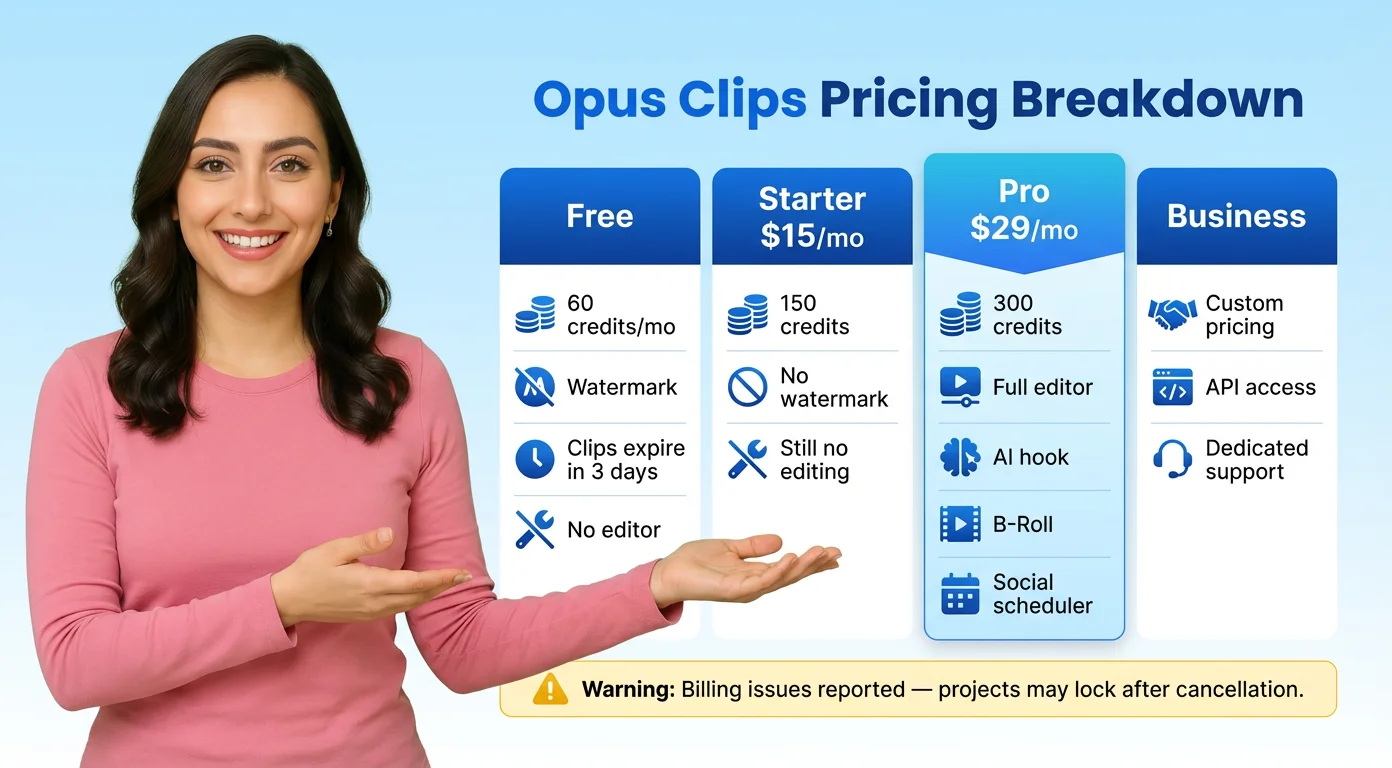
Here is what the OpusClip pricing page listed when we checked on November 5, 2026. These are the company's own figures.
- Free: $0, 60 credits a month, up to 1080p rendered clips, watermark, no editing. After 3 days, clips can no longer be exported.
- Starter: $15 a month, and only available on monthly billing. 150 credits a month, watermark free clips, the editor, one brand template, filler and silence removal. Exports have a 30 day limit.
- Pro: $29 a month, or $14.5 a month when you pay $174 a year. 300 credits a month, unused credits roll over for 2 months, two seats, AI B roll, a social media scheduler, export to Adobe Premiere Pro and DaVinci Resolve, 9:16, 1:1 and 16:9 formats, and video dubbing.
- Business: custom pricing, with API access, priority processing and dedicated support.
Two notes on those prices. The $14.5 figure you see everywhere is the annual rate. Pay monthly and Pro is $29. And the price you see inside the app can differ from the public page: during our October 29 test, the in app upgrade screen offered Starter at $12 a month and Pro at $11.5 a month billed $138 a year. The 4.0 launch post also offers 40% off the first month of Pro on the monthly plan. Check both before you pay.
The credit math is where people get caught. OpusClip charges about one credit per minute of source video, not per clip. As ScaleReach puts it, "A 45-minute video costs 45 credits whether you keep 5 clips or 25." On Pro's 300 credits, that is six 45 minute episodes a month with 30 credits left over. Joel from Essetino Media moved from monthly Starter to yearly Pro because 30 minute client interviews kept eating his credits.
One more thing to read before you cancel. ScaleReach found that one OpusClip help page says remaining credits expire at the end of your billing cycle, while another says they keep their original expiry date, and "Both were live on the same day." It also reports that the cancellation screen says projects are no longer accessible after 3 days. Download anything you want to keep first.
OpusClip Alternatives: CapCut, Vizard, Klap, Submagic, Descript and BIGVU
"Is there something better than Opus Clip?" depends on where your video content workflow starts. Here is how the main options compare, using each company's own pricing page as checked between November 1 and November 5, 2026.
- CapCut: a full manual editor rather than an auto clipper. You get far more creative control, but you choose the moments yourself. If your bottleneck is finding the best 40 seconds in an hour, OpusClip saves more time. If it is making each short look distinct, CapCut gives you more room.
- Vizard: the closest like for like rival. Its free plan includes 60 credits a month, 720p exports, full access to the editor and 3 day storage. We are leaving its paid prices out of this article. In an August 2026 comparison, the affiliate reviewer Vil Vas scored OpusClip 9.7 out of 10 for pure clipping quality, the highest in his test.
- Klap: charges per clip instead of per source minute. Basic is 100 clips a month for $14.50 a month billed yearly ($174). That model suits long recordings where you only want a few clips.
- Submagic: built around captions and short edits. Starter is $19 a month, or $12 a month billed yearly, for 45 credits, which Submagic says equals 15 videos.
- Descript: a text based editor for podcasts and long video, with clip creation built in. The Free plan gives 60 media minutes a month with 720p export. Paid plans are $16, $24 and $50 per person a month on annual billing.
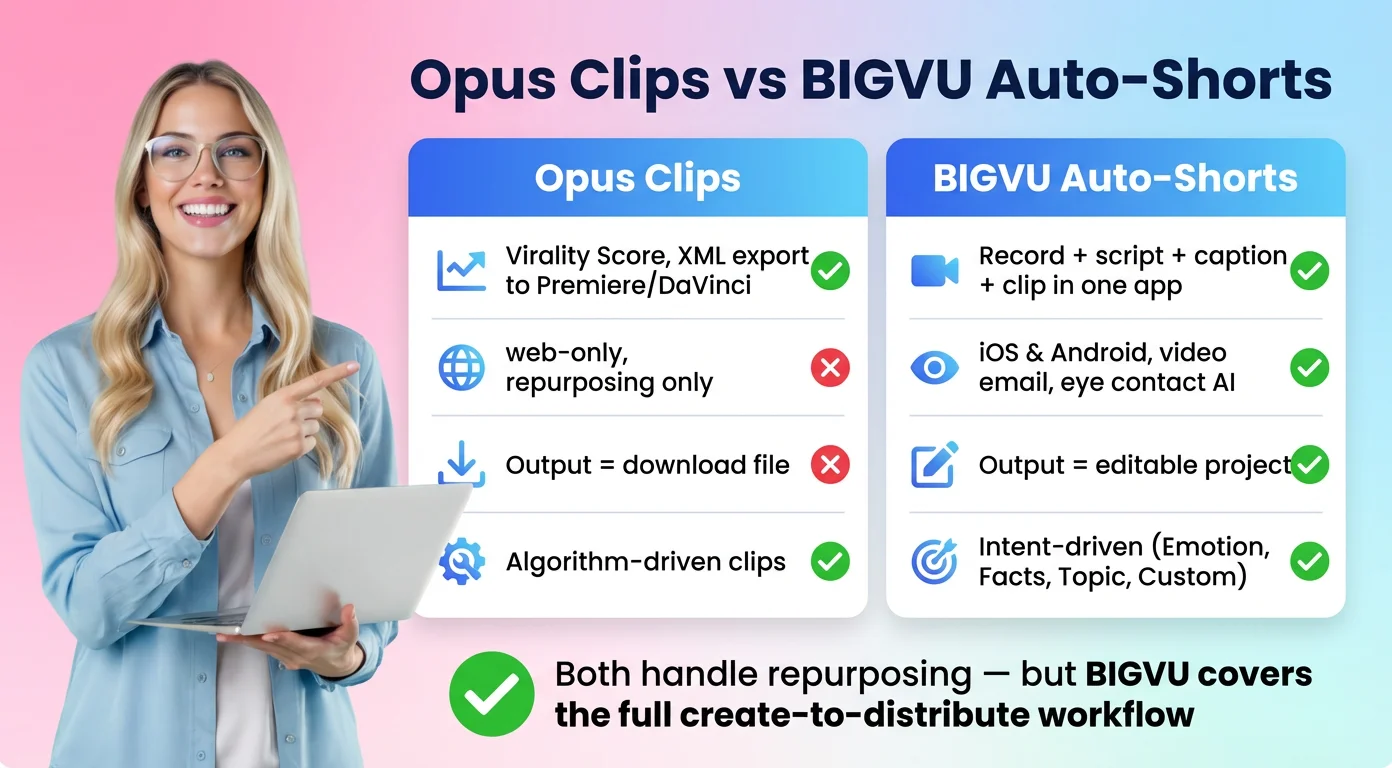
- BIGVU: a video creation app for people who are also making the long video. AI Auto-Shorts turns one recording into several short clips you can review, edit and publish, inside the same app that has a teleprompter, an AI script generator, eye contact correction, subtitles and a social media scheduler.
Our honest read: for pure clip detection on long podcasts, OpusClip is still the one to beat. Even a rival's own 30 day test found most of its clips usable. Where it loses ground is everything around the clip. A small team video workflow that starts with a script and a phone needs more than a clipper, which is where an all in one app like BIGVU earns its place.
Verdict: Is OpusClip Worth It, and Who Should Skip It?
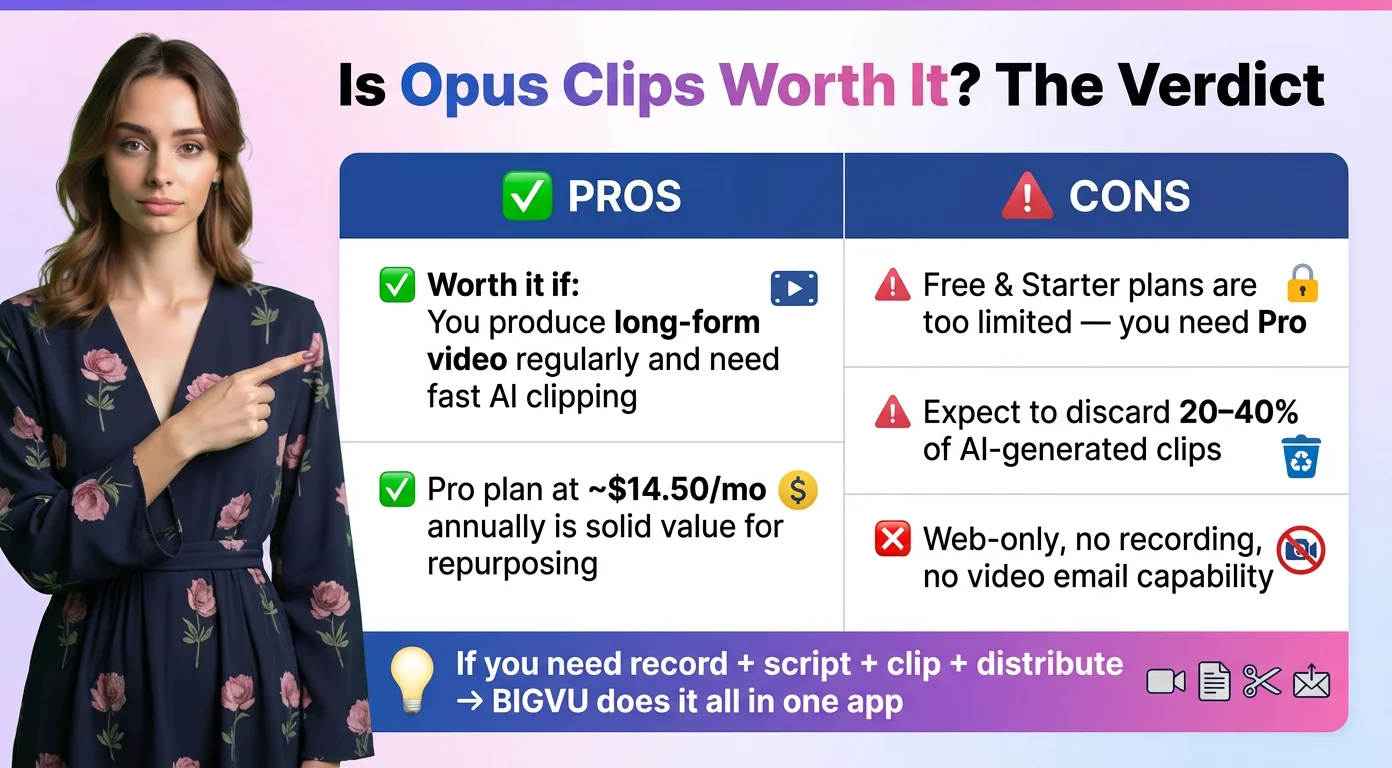
OpusClip is worth it if you publish long talking videos on a schedule and the slow part of your week is scrubbing through them for clips. Techpresso's July 2026 review reached the same conclusion: "For anyone publishing long-form talking-head video on a schedule, OpusClip is worth it in 2026." Google's snippet of OpusClip's Trustpilot page showed 4 out of 5 stars, which matches the mixed but mostly positive tone of user reviews.
Now the other side. In a June 2025 YouTube Short, Jono Bacon says OpusClip "finds hooks based on loud words, emotional tone, or keywords. But it doesn't really [do] subtlety," and that you should "expect to do some post-editing" if your content builds slowly. In an older r/podcasting thread that still ranks on Google, one user was harsher: "I tried it, and I hate it," adding that the tool suggests decent sections but misses the best ones. A six month user on the channel HelperMan warned that AI shorts "can start feeling repetitive" if you lean on default templates, and that captions slip "if you have an accent."
Skip it, or stay on the free plan, if any of these sound like you:
- You record a few long episodes a month and only want two or three clips from each. Per minute credits make that expensive; a per clip plan may fit better.
- Your best moments are quiet, layered or depend on context.
- You mostly work from your phone and need real editing there.
- You have not recorded the long video yet. Then the problem is creation, not clipping.
For that last group, BIGVU covers the whole AI video creation process, from script and teleprompter to Auto-Shorts and scheduling. And if you would rather not make the videos at all, BIGVU SuperAgent is a done with you service: a dedicated strategist, 8 videos a month, editing, thumbnails and publishing for $299 a month billed monthly, month to month.
Our verdict: OpusClip lives up to most of the hype as a fast first draft machine for long videos. Budget for the credits, keep a human on the final cut, and it will save you hours.