BIGVU Auto B-Roll: The Best AI B-Roll Generator for Real Estate Agents
BIGVU was built for real estate agents. Not adapted for them — built for them. The entire platform is designed around one reality: agents are mobile professionals who need to record a market update between showings, publish a listing video from a parking lot, or turn this morning’s property photos into a polished video before the afternoon open house.
The workflow is simple by design: open the app, generate a script with the AI script generator, record using the mobile teleprompter, apply the ai b-roll generator automatically from your transcript, add captions, apply your brand kit, and publish — all in one session, on your phone, in under 10 minutes. No desktop. No upload step. No third-party editor.
Pricing: Free (watermarked), Starter $18.99/mo ($99/yr), AI Pro $39/mo ($159/yr). AI Pro includes the full b-roll generator, brand kit, 4K export, analytics, and AI credits for additional tools.
BIGVU has an Integrated AI B-Roll Generator That Knows Your Script Before You Finish Recording
The Agitation: Other ai b roll generators require a separate upload step. You record somewhere, export a file, upload it to a browser-based tool, wait for transcription, then manually review b-roll placements. For a real estate agent producing five to seven videos per week — between showings, open houses, and client calls — that multi-step loop is exactly the friction that turns daily posting into monthly posting.
BIGVU’s Auto B-Roll is built into the same session where you record. The moment you finish your teleprompter-guided take, the ai b roll video generator already has your full transcript — because it powered your teleprompter delivery. There is no export, no upload, no context switch.
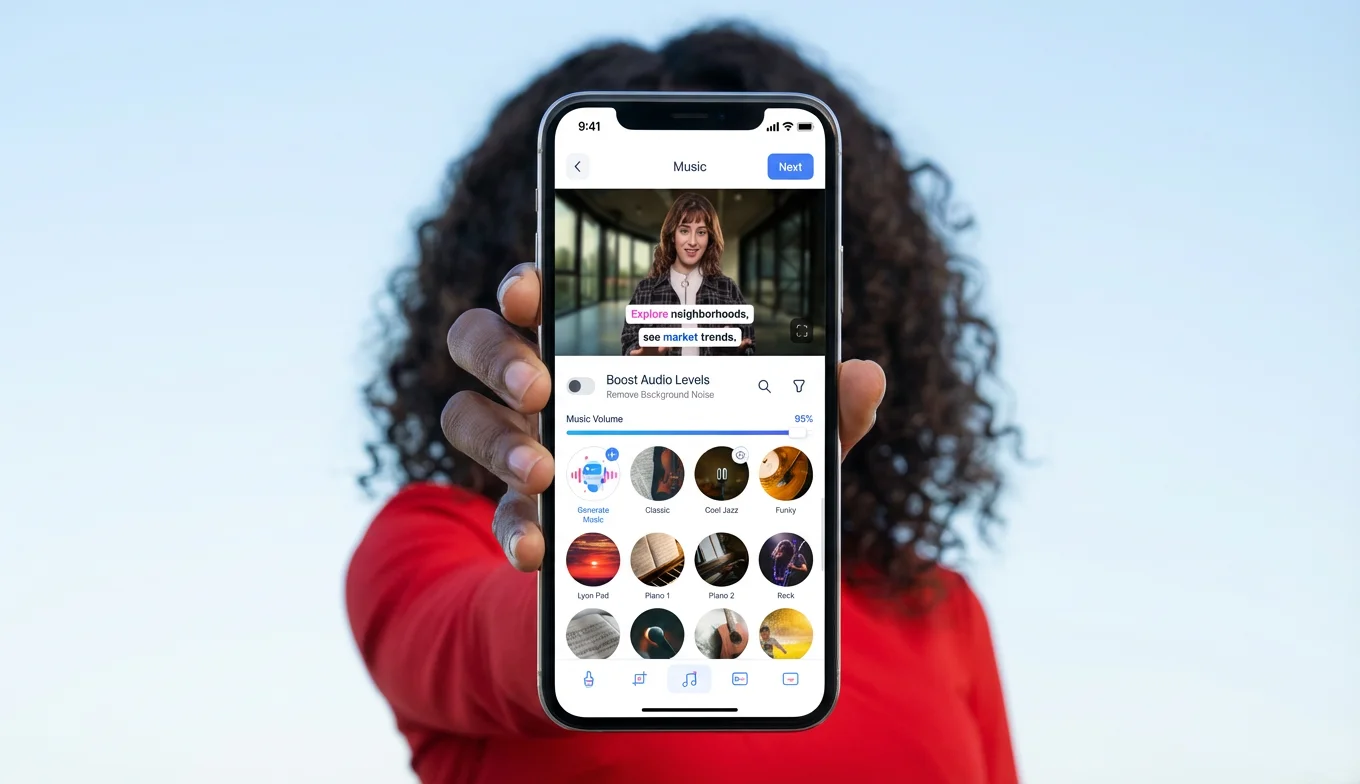
BIGVU scans your script for visual cues — phrases like **“open floor plan,” “waterfront community,” “move-in ready,” or “top-rated school district”** — and automatically overlays contextually matched stock clips across your video. You review, swap in any property walkthrough footage where you want specificity, and hit publish. Post-production collapses into **two minutes**. No manual b roll ai sorting, no licensing headaches, no sync work.
**For listing videos specifically:** BIGVU’s Fototale lets agents skip the on-camera recording step entirely. Upload the listing photos from the MLS, and Fototale transforms them into a dynamic video with AI motion, transitions, captions, and branding — automatically. It’s purpose-built for real estate: turn listing photos into polished video walkthroughs without filming a single frame.
Brand Kit Applied Automatically on Every Video, Every Time
Why a brand kit is a life-saver: The last thing you want is a free b-roll tool and general-purpose ai broll generator that hands you a video file with b-roll applied and leaves everything else to you. Logo placement, color overlays, lower-thirds — you’re on your own. Agents who add these manually know exactly how quickly that step becomes the reason they stop posting.
BIGVU’s brand kit applies your logo, fonts, colors, and intro/outro elements automatically to every video — including every video that goes through the ai b-roll generator and every Fototale listing video. The output is consistently on-brand without any per-video manual work. Every listing video, market update, neighborhood spotlight, and video DM reinforces the same visual identity — the kind of brand consistency that makes sellers remember which agent they keep seeing in their feed.
Wrap up: BIGVU is the only tool in this comparison purpose-built for the way real estate agents actually work. Recording, teleprompter delivery, free b-roll application, listing photo-to-video via Fototale, captioning, and brand kit — all in a single mobile session. For agents who need volume, consistency, and results, this is the workflow.
→ [Start your free trial of BIGV](https://bigvu.tv/)U — the all-in-one ai b-roll generator for real estate agents![[object Object]](/blog/images/airtable/section1-win-more-listings-with-the-best-ai.webp)
VEED Magic B-Roll: A Browser-Based Free B-Roll Generator With a Mobile Blind Spot
VEED is a browser-based video editor with a Magic B-Roll feature that functions as a free b roll generator for talking-head content. It’s a capable tool — it does auto-captions, subtitles, a basic brand kit on Pro, stock media access, and clean audio tools. For creators already working in a browser-based editing workflow, it covers a lot of ground. The honest limitation for real estate agents specifically comes down to two things: where you work, and how many steps it takes.
Veed Pricing: Free (watermarked, 720p), Lite $12/mo, Pro $29/mo.
Factor 1 — Two-Click Free B-Roll via Magic Tools
VEED’s Magic B-Roll reads the transcription of your uploaded video and uses it as a brief for selecting overlay visuals. Upload, click Magic Tools, select Magic B-Roll, and the ai b roll generator places clips automatically.
VEED transcribes your footage, identifies key moments, and overlays relevant stock visuals to break up talking-head footage. You can swap clips, apply filters, add captions, and access their stock library — all in the browser. But! The free tier gives you **one use of Magic B-Roll** before it requires a paid upgrade. User reviews flag the ai broll output as frequently “random, meme-like,” “out of context,” and “not editable enough” for professional listing content.
Desktop vs. Mobile, Upload Step vs. None
VEED lives in a browser. That means your workflow is: record on your phone, transfer the file to your laptop, upload to VEED from your phone, wait for transcription, apply b-roll, export, and publish. That’s five to six steps across two devices. For a real estate agent between showings, this is the workflow that gets skipped.
BIGVU’s b-roll generator is built into the recording app itself — on your phone, where you already are. You record with the mobile teleprompter, b-roll is applied from the same session, captions are added automatically, and you publish directly from the app. No desktop, no upload, no transfer. VEED does captions and b-roll well — it just requires you to be sitting at a computer to use them. Most real estate agents are not.
Wrap up: VEED is a solid browser-based editor with genuine features. The core gap for real estate agents is that it’s not a mobile-first tool — and real estate is a mobile-first job. If you’re already editing at a desk, VEED is reasonable. If you’re recording at a property and need to publish before your next appointment, BIGVU is the only option that works.
→ See how BIGVU’s ai b-roll generator works on mobile — try it free
Descript AI B-Roll: Custom AI B Roll Video Generator for Branded Footage
Descript is a professional video and podcast editing tool built around a text-based workflow. Its Underlord AI generates custom b-roll footage from a text prompt — rather than pulling from a stock library, you describe what you want and the ai b roll video generator creates it. Useful when the footage you need simply doesn’t exist in any free b-roll library.
Pricing: Free (1hr transcription, watermarked), Hobbyist $16/mo, Creator $24/mo, Business $50/mo.
AI B Roll Video Generator That Creates Footage From Scratch
The Agitation: Standard free b-roll covers generic scenes — handshakes, coffee cups, city skylines. Real estate agents often need footage that no library carries: a specific neighborhood vibe, a branded motion element, a conceptual visual tied to a particular market position. Stock searches for “FSBO lead conversion” or “expired listing outreach” return nothing useful.
Descript’s Underlord generates custom b-roll from a text prompt. The guidance from Descript itself is to be “almost comically specific” — because vague prompts produce generic results. This is a tool for creators who know precisely what they want visually and are willing to invest time prompting for it.
Inside Descript, you add scene placeholders, then write your prompt in the Generate Video panel — selecting a model, style, or reference image. The generated clip drops into your timeline as an editable layer. You can adjust length, reposition it, or use a screenshot as the reference image for a follow-up prompt to generate a logo animation layered on top. The output is genuinely custom — no shared stock library, no free broll that other agents are also using.
Why Custom B Roll AI Doesn’t Replace a Fast Integrated Workflow
User reviews consistently note that agents relying on Descript for b-roll end up sourcing and placing most visuals manually, because the AI is prompt-sensitive and “needs very specific context” to produce useful results. The quality of your output depends entirely on how well you articulate the visual in writing — and doing that for every listing video quickly becomes unsustainable at volume.
For a real estate agent producing five to seven videos per week, Descript’s custom b roll ai generation requires more creative investment per video than any auto-overlay approach. It’s genuinely powerful for hero content — a brand launch, a high-production listing piece, a market authority video. For daily social content, it’s too slow. BIGVU’s AI script generator and b-roll generator handle the same result automatically from your transcript — no prompting required.
Wrap up: Descript earns its place when you need footage that no free b roll library can provide. For volume and daily real estate content, it’s a supplement — not a replacement for an integrated ai b-roll generator like BIGVU.
Runway ML and Pictory: Specialist Free B-Roll and AI Broll Tools
Runway ML — Prosumer AI B Roll Generator for Premium Content
Runway is a professional AI video generation platform favored by creators who want granular control over generated footage. It’s powerful for custom visual sequences that don’t exist in any free b-roll library — useful for abstract market authority content, brand storytelling, or high-production listing videos where the visual narrative needs precise control. The learning curve is steep and pricing reflects a prosumer audience. For real estate agents: best suited for quarterly brand videos or high-production hero pieces, not for daily social content at volume.
Runway Pricing: Free (125 one-time credits), Standard $12/mo (625 credits), Pro $28/mo (2,250 credits), Unlimited $76/mo. Credits are consumed per second of generated video — the Standard plan produces roughly 125 seconds of Gen-4 Turbo footage per month before you’re out.
Pictory — Free B-Roll Generator for Agents Repurposing Written Content
Pictory converts text — blog posts, email newsletters, market reports — into video automatically, pulling stock footage and images to match the content. Its integrated Storyblocks library gives agents access to substantial free b roll footage, with users reporting it saves around $300 versus a separate stock subscription. The AI selects contextually relevant clips that play while a voiceover or on-screen text delivers the message. For real estate agents: best for turning existing written content (market updates, neighborhood guides, buyer tips) into video without recording on camera. Less suited for listing-specific videos where agent presence and brand identity matter.
Pricing: Starter $19/mo (30 videos/month), Professional $29/mo (60 videos/month), Teams $99/mo. No permanent free plan — 14-day trial available. BIGVU handles the same repurposing use case inside the same app where agents record, with the added benefit of a mobile teleprompter, brand kit, and auto-captions — and a social media scheduler to publish directly from the app.
Why Real Estate Agents Only Need One AI B-Roll Generator: BIGVU
The honest answer for most real estate agents is that you don’t need five tools. You need one that does everything well — and works from your phone, not your desk.
Every tool in this comparison — VEED, Descript, Runway, Pictory — solves one piece of the video production puzzle. VEED adds free b-roll to uploaded recordings (browser only). Descript generates custom b roll ai footage from prompts (desktop, steep learning curve). Runway produces prosumer-level ai broll on a credit system that runs out faster than you’d expect. Pictory turns text into video with free b roll from Storyblocks (no mobile recording, no teleprompter). Each requires a separate login, a separate workflow step, and a separate learning curve.
BIGVU solves the entire workflow in a single app, on your phone, from anywhere:
- AI script generator — generates your listing or market update script in seconds
- Mobile teleprompter — delivers confident, eye-contact recording on your phone, wherever you are
- Auto B-Roll — the integrated ai b-roll generator that overlays contextually matched free b-roll automatically from your transcript
- Auto-captions — applied instantly, formatted for muted social viewing
- Brand kit — logo, fonts, colors, and intro/outro applied automatically to every video
- Social media scheduler — publish to Instagram, TikTok, LinkedIn, and YouTube directly from the app
No separate b roll app. No export-upload-edit loop. No desktop required. No stitching together a toolstack. Real estate agents who switch to BIGVU typically reclaim 3 to 5 hours per week they were spending across fragmented workflows — and they can produce content from anywhere: a listing walkthrough, a parking lot between showings, or a five-minute window before an open house.
The question isn’t which ai b-roll generator is best in isolation. It’s which workflow lets you produce professional, branded, consistently published listing content at volume — while you’re busy selling homes. That answer is BIGVU.
→ Start creating with BIGVU — the only ai b-roll generator real estate agents need. Try it free.