Why the Right Background Music Changes Everything (and Why Most Free Options Fall Short)
Background music does more than fill silence. It sets emotional context, controls pacing, and signals professionalism. Research consistently shows that viewers are more likely to watch a video to the end when it has a well-matched soundtrack — and more likely to abandon it when the music feels generic or mismatched.
For business video creators, the stakes go beyond engagement. Using the wrong track can result in a copyright strike that mutes your content, demonetizes your channel, or forces you to re-edit and re-upload. This is the trap most "free music" libraries set. Canva offers an audio library, but the best tracks require a Pro subscription, and their popular music catalog (500,000+ songs) is restricted to personal non-commercial use and only available in select regions. CapCut provides thousands of tracks that work inside the app, but many are only licensed for TikTok and CapCut's ecosystem — use them on YouTube or in a commercial ad, and you risk a Content ID claim. InShot covers essential genres but offers a smaller library with basic audio tools and no commercial licensing clarity.
The issue is that "free" and "commercially licensed" are two different things. A track can be free to preview and even free to embed, but still require a paid license the moment you use it in an ad, a client video, or monetized content. For anyone creating business video — marketing, sales outreach, social media, training, real estate tours — you need tracks that are genuinely cleared for commercial use, with no per-use fees, no attribution requirements, and no platform lock-in.
This is where having a curated, commercially licensed music library built directly into your video creation tool becomes a significant advantage over cobbling together tracks from separate sources.
![[object Object]](/blog/images/airtable/section1-how-to-add-music-to-videos-free-300-commercial-free-tracks.webp)
How to Choose the Right Track: Genre, Mood, and Vibe Explained
Selecting background music isn't about finding a song you personally enjoy — it's about matching the audio to the emotional job your video needs to do. Professional music libraries organize tracks along three dimensions: genre, mood, and vibe. Understanding the difference helps you narrow 300 tracks down to the perfect one in seconds.
**Genre** defines the musical style and instrumentation. It's the broadest filter. A corporate explainer calls for a different sound than a travel vlog or a fitness tutorial. BIGVU's library spans 18 genres: Acoustic, Ambient, Cinematic, Classical, Corporate, EDM, Electronic, Folk, Jazz, Latin, Lo-fi, Lounge, Pop, Retro, Symphonic, Tribal, Urban, and World. The largest collections are Electronic (61 tracks), Ambient (59), Acoustic (40), Lo-fi (38), and Urban (36) — giving you deep options in the categories business video creators use most.
**Mood** describes the emotional character of the track — what the listener should feel. A product launch video might need an Inspiring mood. A customer testimonial works better with Warm or Peaceful. An intro to a dramatic brand story benefits from Dark or Mysterious. BIGVU offers 11 mood filters: Dark, Dreamy, Elegant, Expressive, Happy, Inspiring, Mysterious, Peaceful, Romantic, Sensual, Serious, and Warm. The top three — Warm (109 tracks), Peaceful (107), and Inspiring (72) — reflect how heavily the library is weighted toward professional and brand-friendly content.
**Vibe** captures the energy and texture — think of it as the personality layer on top of mood. Two tracks can both be "inspiring" but one might be Atmospheric (slow build, textured layers) while another is Dynamic (driving rhythm, forward momentum). BIGVU's 13 vibe options include Atmospheric, Chill, Down-to-earth, Dramatic, Dynamic, Energetic, Epic, Funky, Groovy, Low-key, Meditation, and Upbeat. Atmospheric is the largest category at 128 tracks, followed by Dynamic (63) and Upbeat (43).
The power of this three-layer system is that you can combine filters. Select "Corporate" genre + "Inspiring" mood + "Dynamic" vibe and you'll get a tight shortlist of tracks purpose-built for a product demo or investor pitch. Select "Lo-fi" + "Peaceful" + "Chill" and you're in podcast-intro territory.
**Quick-reference guide for common business video scenarios:**
For corporate explainers and product demos, start with Corporate or Cinematic genre, Inspiring or Serious mood, and Dynamic or Atmospheric vibe. For social media content, try Pop, Electronic, or Urban genre with Happy or Upbeat mood and Energetic or Groovy vibe. For testimonials and case studies, Acoustic or Ambient genre with Warm or Peaceful mood and Down-to-earth or Atmospheric vibe. For training and educational videos, Lo-fi or Ambient genre paired with Peaceful mood and Chill or Low-key vibe. For brand storytelling, Cinematic or Symphonic genre with Dramatic or Dreamy mood and Epic or Atmospheric vibe.
**Data tables for graph display:**
**Table 1 — Tracks by Genre:** Electronic 61, Ambient 59, Acoustic 40, Lo-fi 38, Urban 36, Cinematic 34, World 31, Latin 15, Folk 15, Retro 14, Pop 13, Classical 13, EDM 11, Jazz 9, Corporate 8, Symphonic 7, Lounge 6, Tribal 2.
**Table 2 — Tracks by Mood:** Warm 109, Peaceful 107, Inspiring 72, Dreamy 57, Mysterious 30, Dark 29, Romantic 27, Happy 14, Energetic 14, Expressive 9, Sensual 6, Serious 5, Elegant 2.
**Table 3 — Tracks by Vibe:** Atmospheric 128, Dynamic 63, Upbeat 43, Low-key 33, Epic 32, Chill 30, Groovy 28, Dramatic 21, Meditation 19, Down-to-earth 14, Funky 2.
**Table 4 — Tracks by Business Use Case:** Warm & Cozy 153, Calm & Wellness 135, Lo-fi & Chill 83, Social Media & Upbeat 80, Corporate & Professional 78, Electronic & Urban 76, Cinematic & Epic 63, World & Cultural 54.
**Table 5 — Instrument Families:** Synths & Electronic 239, Drums & Percussion 190, Piano & Keys 144, Strings & Orchestral 121, Guitar 94, Brass & Woodwinds 61, World Instruments 45.
**Table 6 — Top 10 Instruments:** Piano 118, Synth Pads 66, Strings 64, Acoustic Guitar 60, Synths 51, Orchestra 40, Electronic Drums 32, 808s 30, Drums 23, Ambient Textures 18.
![[object Object]](/blog/images/airtable/section2-how-to-add-music-to-videos-free-300-commercial-free-tracks.webp)
Add Music to Your Videos in BIGVU — No Licensing Headaches
BIGVU's music library is built directly into the video creation workflow. You don't need to search external sites, download files, check licenses, or import audio into a separate editor. The music step happens right after you record or import your video, before you export.
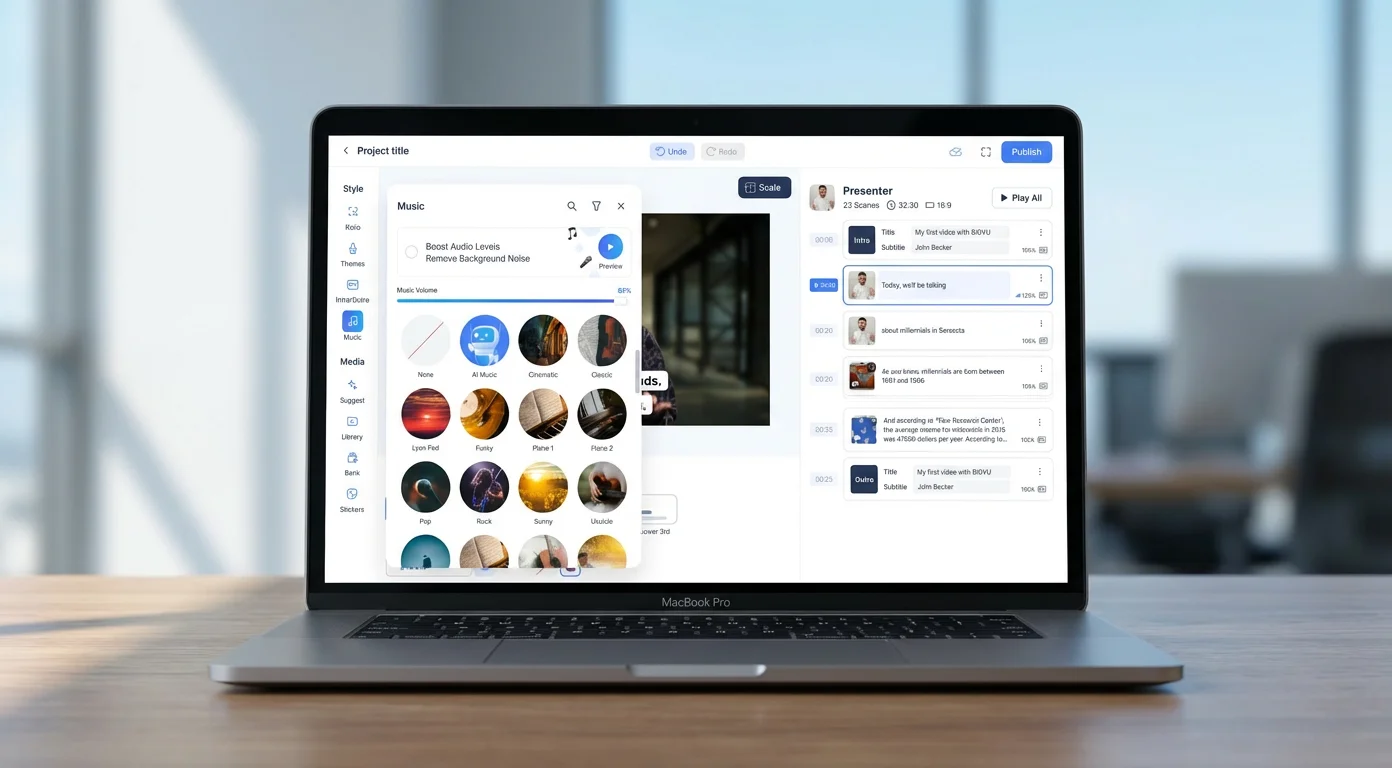
Here's how it works. After recording your talking-head video (or importing any clip), you reach the Music screen. At the top, you'll see a toggle to "Boost Audio Levels" and "Remove Background Noise" — both of which clean up your spoken audio before the music layer is added. Below that is a search bar and a filter icon. Tap the filter icon and you get the three-layer selection system: Genre, Mood, and Vibe. Select any combination — for example, Corporate genre, Inspiring mood, Dynamic vibe — and tap "Apply." The library instantly narrows to the tracks that match all your criteria.
You can also browse visually. Each track has a cover image, a name, and a preview. Tracks like "Rock," "Sunny," "Ukulele," "Piano 1," "Lyon Pad," "Funky," and "Cool Jazz" give you an immediate sense of the sound before you tap. The library includes 296 purpose-built tracks spanning 94 unique instruments — from piano and acoustic guitar to tabla, erhu, koto, and taiko drums. Every track is tagged across the full genre, mood, and vibe system, so the same track might appear under multiple relevant searches.
The critical difference is licensing. Every track in BIGVU's library is commercial-free, meaning you can use it in any video — marketing content, paid ads, client work, social media, sales outreach, training materials — without worrying about copyright claims, Content ID matches, or per-use fees. There's no separate music subscription, no attribution requirement, and no platform restriction. The track you pick in BIGVU stays licensed wherever you publish the video.
And when 300 tracks aren't enough, BIGVU offers an AI music generator that creates custom tracks on demand. Describe the mood, tempo, and style you need, and the AI produces an original composition that's exclusively yours — no shared licensing, no risk of another creator using the same track.
This integrated approach means your workflow stays in one place: record with the teleprompter, add captions, apply your brand colors, select music, and export — all without switching tools. For anyone producing regular video content for business, this eliminates the fragmented process of recording in one app, editing in another, sourcing music from a third, and checking licenses on a fourth.
![[object Object],[object Object]](/blog/images/airtable/section3-how-to-add-music-to-videos-free-300-commercial-free-tracks.webp)
How to Mix Music and Voice for a Professional Sound
Finding the right track is only half the job. How you mix it with your spoken audio is what separates a polished video from an amateur one. Poor audio mixing is one of the most common problems in creator content — music too loud, music that doesn't fade cleanly at the end, or a background track that clashes with the energy of the speech. Getting this right doesn't require a sound engineer. It requires understanding three principles: volume balance, ducking, and emotional sync.
**Volume balance: the -20 dB rule**
Background music should sit far enough below your voice that viewers never have to strain to hear you — but high enough that it's clearly present and contributing to the mood. A simple benchmark is to aim for your music track to land around 15–20 dB below your spoken audio level. In practice, this means that when someone is speaking, the music should feel like it's "behind" the voice rather than competing with it. If you can clearly hear the lyrics or melody of the background track while someone is talking, the music is too loud. If you need to look for the music to notice it's there, it might be too quiet to do its emotional job.
**Ducking: the technique professional editors use automatically**
Audio ducking is the process of automatically lowering the music volume when speech is present and raising it back during pauses. You've heard this in podcasts, YouTube videos, and ads without realizing it — the music swells up between sentences and pulls back when the speaker comes in. The effect makes dialogue feel effortless to hear while keeping the music present throughout. BIGVU handles this automatically as part of its audio processing layer, alongside background noise removal and audio level boosting. You don't need to set keyframes or adjust automation curves — the tool manages the relationship between your voice and the music track so the result sounds balanced from the first listen.
**Emotional sync: matching the music's energy to the video's arc**
The most underrated mixing decision isn't volume — it's timing. A track that starts at full energy on the first frame can feel jarring. A track that builds gradually matches how most business videos work: a calm opening, a building middle, and a confident close. When choosing a track in BIGVU, use the vibe filters to think about the arc, not just the moment. An Atmospheric track works well as a consistent backdrop throughout. A Dynamic track is better when you want energy to rise toward a call to action. An Epic track can anchor a cinematic brand story opener but may feel overwrought for a simple product walkthrough.
A few practical habits that improve every mix:
Start and end with a few seconds of music-only before your first word and after your last. This gives the audio context and prevents abrupt starts and stops. Avoid tracks with strong melodic hooks or recognizable chord progressions if your video requires deep listening — the brain will want to follow the music instead of your words. For short-form video (under 60 seconds), pick a track that feels complete even when it's cut off — most of BIGVU's library is structured with loopable segments for exactly this reason. For videos with on-screen text, match the tempo of the music to the reading speed of your copy — fast text with slow music creates cognitive friction, and vice versa.
The goal is to make the music disappear into the experience. When it's done right, viewers won't comment on the music — but they'll feel it in how engaged and confident the video feels from start to finish.
The Best Free Music Libraries for Video Creators — and How AI Music Is Changing Everything
Before committing to any music workflow, it's worth understanding what's available outside of dedicated video tools — and where each option creates friction for serious content creators. The landscape has shifted significantly in 2026, with AI music generation now entering mainstream creative platforms. Here's what you need to know.
**YouTube Audio Library**
YouTube's built-in audio library offers several hundred free tracks and sound effects, organized by genre, mood, instrument, and duration. The quality ranges widely — some tracks are genuinely well-produced, others feel like placeholder audio. The licensing terms are mostly clear: tracks labeled "Free to use" can be used in any video, including commercial content, without attribution. Tracks labeled "Attribution required" are also free but need a credit in the video description. The main limitation is platform lock-in: the library is optimized for YouTube publishing. If you're producing video for LinkedIn, TikTok, a client deliverable, or a paid ad campaign, licensing terms vary track by track and the search interface doesn't make this easy to verify at scale. There's no mobile app integration, no in-app preview within your editing workflow, and no AI generation capability.
**Pixabay Music**
Pixabay's music section has grown significantly and now offers thousands of tracks under a simplified license that allows commercial use without attribution. The quality ceiling is higher than YouTube's library for certain genres — particularly ambient, lo-fi, and cinematic. The limitation is curation quality: the library is largely contributor-uploaded, so track quality is inconsistent, tagging is unreliable, and finding a track that fits a specific business video scenario often requires listening through many mismatches. There's no integration with video editing tools, so your workflow stays fragmented — find a track on Pixabay, download it, import it into your editor, check the license document, then continue.
**Uppbeat**
Uppbeat positions itself as a creator-first music platform with a free tier that offers access to a curated selection of tracks cleared for YouTube and social media. The free tier requires attribution via a unique track code in your description. The paid tier removes attribution requirements and expands library access. Track quality is notably higher than most open-contribution libraries — the curation is genuinely good. The limitation is the freemium model: the tracks worth using in professional content almost always sit behind the paywall, and the free tier is designed to drive conversion rather than serve as a standalone resource.
**Epidemic Sound and Artlist**
Both are subscription platforms — not free alternatives, but worth understanding as context. Epidemic Sound charges around $15/month for personal creators and $49/month for businesses, covering YouTube, social media, podcasts, and limited broadcast use. Artlist charges around $200/year and offers broader licensing coverage including film and advertising use. Both platforms have strong curation and large libraries. The limitation is that the subscription follows the creator, not the content — so if you're producing video for a client or an agency, licensing terms become complicated. Neither integrates directly into a video creation workflow; both are separate subscription services you manage alongside your editing tool.
**AI Music Generators: Suno, Gemini Lyria 3, and What They Actually Offer**
The most significant shift in music for video creators in 2026 is the arrival of AI music generation at mass scale. Two platforms have become the reference points: Suno and Google's Gemini with Lyria 3.
Suno is the most capable standalone AI music generator available to creators today. You describe what you want — mood, genre, tempo, instruments, even custom lyrics — and the platform generates a complete song including vocals and instrumentation in seconds. The output quality is genuinely impressive for background tracks, intros, and social content. Suno raised $250 million at a $2.45 billion valuation, and the platform has established itself as the category leader for full-song generation. The licensing situation, however, requires attention. Free plan tracks are for personal use only — they cannot be used in monetized content. Pro and Premier plan subscribers receive commercial use rights, which cover monetized YouTube videos, podcasts, ads, and social media. However, the copyright situation is more complex than it first appears: the US Copyright Office does not recognize AI-generated audio as copyrightable by users, which means if someone copies your Suno-generated track, your legal standing is limited. Suno is also currently in active litigation with major labels over its training data — a case that remains unresolved as of early 2026.
Google Gemini's Lyria 3, launched in beta in February 2026, brings AI music generation directly into the Gemini app — one of the most widely used AI platforms in the world. Powered by Google DeepMind's latest model, Lyria 3 generates 30-second tracks from text prompts or even uploaded photos, complete with lyrics, vocals, and custom cover art. You can specify genre, era, tempo, instruments, and vocal style. All tracks are watermarked with Google's SynthID technology to identify them as AI-generated. The quality is high for short-form content, and the integration with YouTube's Dream Track feature makes it a natural fit for Shorts creators. The constraints are significant for business use: tracks are capped at 30 seconds, and the feature is positioned as a personal expression tool rather than a professional production resource. Commercial licensing terms are not as clearly defined as a dedicated platform like Suno.
Both tools signal that AI-generated music is no longer an experiment — it's a mainstream capability. But they also share a limitation that matters for video creators who publish regularly: neither is integrated into a video creation workflow. You generate music in one place, then import it into wherever you're editing. The creative iteration — matching a track's energy to a specific video, previewing it against your footage, adjusting your edit to fit — still requires switching contexts.
**The case for a built-in library**
What every external music source — traditional libraries, subscription platforms, and AI generators alike — has in common is friction at the point of production. You maintain a separate account, navigate away from your video workflow, generate or download files, import them, verify licensing terms, and then continue editing. For creators producing one video a month, this is manageable. For anyone producing regular video content — weekly social posts, ongoing outreach videos, course content, real estate tours — the overhead compounds with every publish.
A commercially licensed library built into your video creation tool eliminates every step in that process. You select music while you're already in your workflow. The licensing is uniform across every track. There's no download, no import, no external verification. And when you need something the library doesn't have, BIGVU's AI music generator handles it on demand — the same capability as Suno or Gemini, but without leaving your editing environment.
For business video creators, the question isn't which external source has the best tracks. It's whether managing a fragmented music workflow is worth the time it costs every time you publish.